Nintendo 3DS Cartridge Reader Replacement
ID: 171913
Description: If your cartridge reader is not working on your...
Steps:
- Use a JIS #00 screwdriver to loosen the four screws along the top of the back cover.
- These screws are captive and should remain in the cover after loosing them.
- JIS (Japanese Industrial Standards) screws are not the same as Phillips. To avoid stripping these screws, make sure you are using a JIS #00 screwdriver and not a PHILLIPS #00 screwdriver. You can use a PHILLIPS #00 with a lot of downwards force but be warned this will deform the screw head and you risk stripping it.
- iFixit's Phillips head screwdriver is designed to reduce damage on JIS head screws so it should be fine to use, still apply more force. Make sure it's iFixit's official Phillips screwdriver as we are unaware of any other manufacturer who does this.
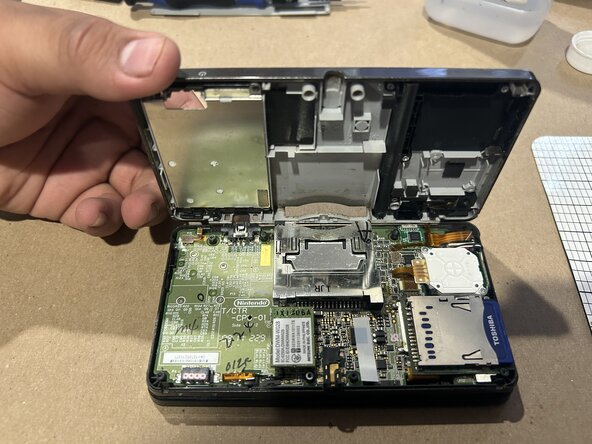
- Use a JIS #00 screwdriver to remove all 10 screws to access the third layer and the motherboard of the 3DS.
- Don't forget the one near the game card slot, it is silver, not black.
- Exercise caution when opening the device. There are delicate ribbon cables at the top of the device that you risk ripping, so open slowly and gently.
- Make sure to keep the screws, as you will need them for reassembly. Don't lose them!
- To remove the cartridge reader look for 4 solder joints, 2 on each side of the reader (see image).
- Apply heat to them with a soldering iron to melt the solder and take out the reader.
- Use a spudger to lift the reader out of the board as you apply heat.
- You can apply some solder flux or even some new solder wire to form an alloy between the old and new metals, this would ease the task.
- The soldering iron can cause severe burns if not used properly. Proceed with caution and have an adult in the room with you if underage.
- Align the new reader with the solder points
- Use a soldering iron to connect it to the motherboard.
- Be careful when soldering and work in a well-ventilated area.
- Before reassembling the device use isopropyl alcohol and a cotton swab and clean the surrounding area, removing all of the remaining flux residue.