Soundboks 4 PCBA Replacement
ID: 240394
Description: Sometimes your SOUNDBOKS just isn't feeling it....
Steps:
- Turn off your speaker by disconnecting the battery
- Unscrew the Volume Knob by using the 2.5mm Hex/Allen Key
- Remove the nut and washer using the 10mm Socket Tool
- Unscrew the UI panel with the 3mm Hex bit - 6 screws in total
- Pull the panel out at an angle. Pulling it straight can damage the PCBA!
- Unplug all Molex style connectors
- Only remove Red & White cables now - 6 wires in total
- Cut the zip-tie on the antenna cable (from the backside)
- Pull (don't cut) the glued cable off the PCBA using the cutter tool
- Disconnect the antenna cable
- Be careful not to damage the cable
- Using a 2mm Hex, unscrew all screws - 4 in total.
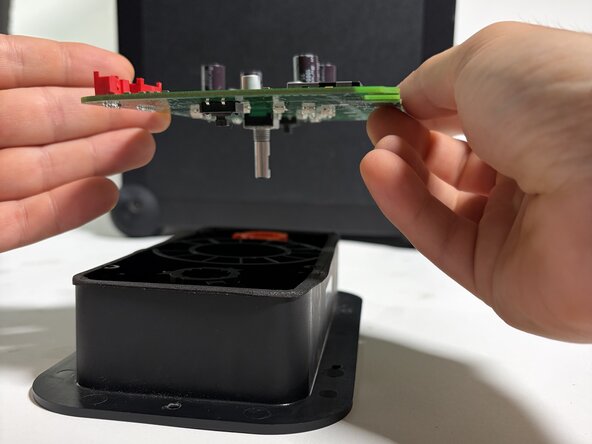
- Remove the PCBA from the plastic housing
- 4 Screws back in - don't over-tighten!
- Antenna cable back on - use a zip-tie and cut of the excess
- Add a small drop of silicone glue (at the red arrow)
- If using a glue substitute, make sure it is not corrosive or hot-glue
- Add the washer first, then the 10mm nut
- Tighten the 10mm nut
- The encoder has a flat side - match this side with the volume knob screw
- Add pressure from top while tightening with the 2.5mm key
- No power tools here - stuff may break