Huawei M750 Charging Port Replacement
ID: 106543
Description: This guide will lead you throughout the process...
Steps:
- Depress the top of the battery cover, and pull downwards towards the base of the phone.
- Remove the battery by levering the battery out, using the cut just below the camera.
- Use the opening tool to start prying the camera and speaker cover, starting from the battery side.
- Work the opening tool around the border of the camera and speaker cover, until it comes loose.
- Using the T5 Torx screwdriver, remove the six 6mm screws.
- Using the opening tool, pry the back panel from the front panel.
- Work your way around the phone until the panels separate evenly.
- This step may require a substantial amount of leverage.
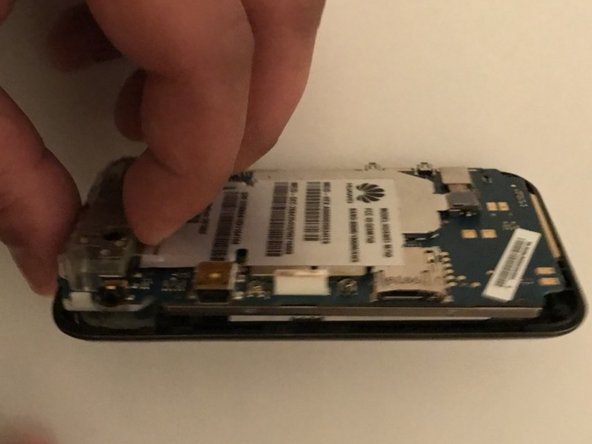
- Using the opening tool, start prying out the motherboard from the front panel along the border.
- When the motherboard seems separated from the front panel, pull it outwards.
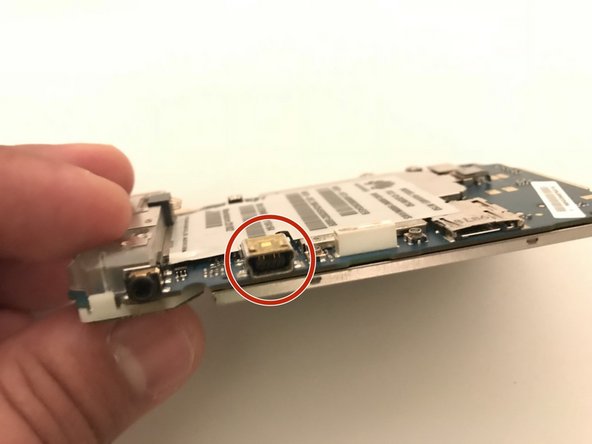
- The charging port is soldered to the motherboard, use this guide to do the replacement.