Acer Aspire V5-571P-6815 Charging Port Replacement
ID: 109930
Description: Follow this guide to replace the charging port...
Steps:
- Turn off the computer and unplug all power.
- Slide the locking latch to the right and hold while pulling the battery out with your other hand.
- Remove the two 7mm Phillips #00 screws from the bottom of the laptop.
- Insert a plastic opening tool underneath the keyboard and pry upwards.
- Slide the plastic opening tool around the perimeter to free the keyboard.
- Flip the keyboard over and onto the palm rest.
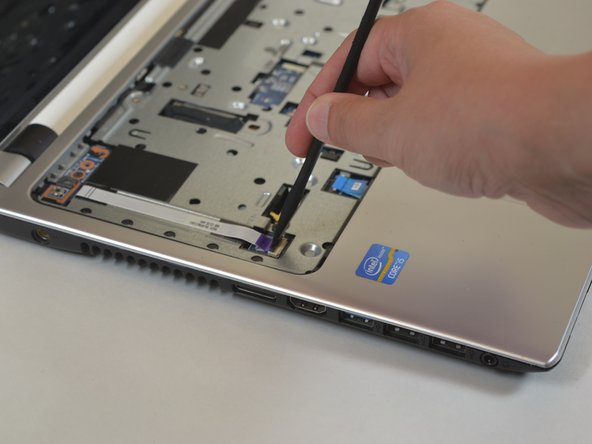
- Use a spudger to flip up the retaining flap on the keyboard ribbon cable ZIF socket.
- Pull the ribbon cable out of the socket.
- Remove the keyboard from the laptop.
- Remove the six 6mm Phillips #0 screws from underneath the keyboard.
- Remove the sixteen 6mm Phillips #0 screws from the bottom cover.
- Use a spudger to flip up the retaining flap on the ribbon cable ZIF socket.
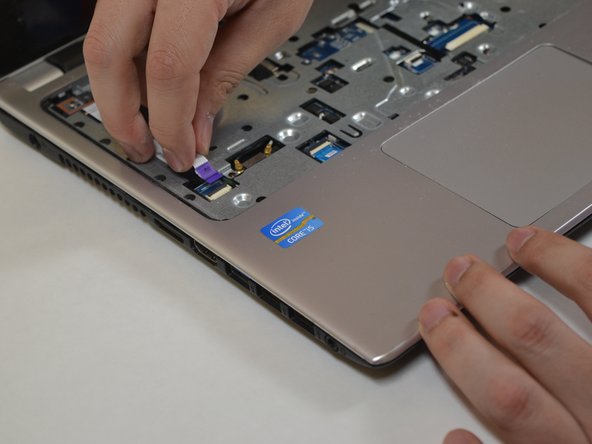
- Pull the ribbon cable from the socket.
- Use a spudger to flip up the retaining flap on the ribbon cable ZIF socket.
- Pull the ribbon cable from the socket.
- Use a plastic opening tool to pry up the palm rest from the laptop body.
- Remove the palm rest from the laptop.
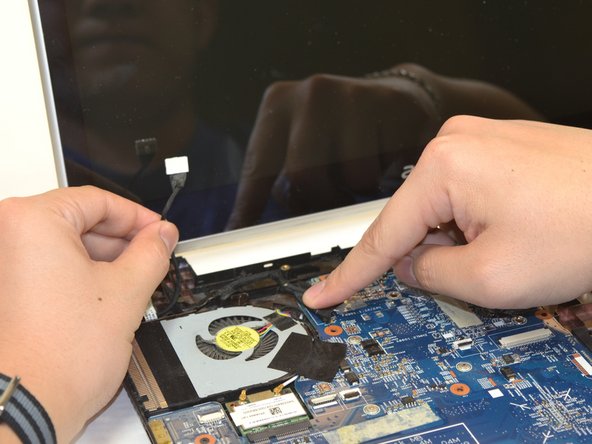
- Disconnect the charging port cable from the motherboard.
- You might have to remove some electrical tape that is in the way.
- Lift the charging port up and out of the laptop.