ZTE Tempo Headphone Jack Replacement
ID: 115340
Description: If your ZTE Tempo smartphone (model 9131)...
Steps:
- Use the Phillips #0 screwdriver to remove the eight 5 mm screws securing the back case.
- Insert the plastic opening tool into the seam between the back case and the phone body.
- Gently slide the tool along the edges to release the clips and lift off the back cover.
- Pry open by finding an edge and forcing it open with the plastic opening tool.
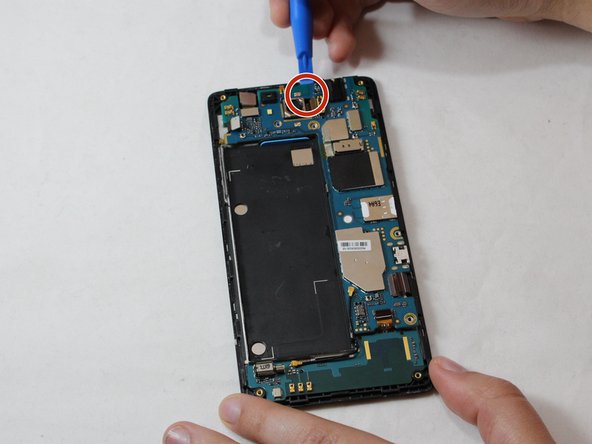
- Use the plastic opening tool to gently lift and disconnect the wires.
- Insert the plastic opening tool under the edge of the motherboard and gently lift it.
- Slide the plastic opening tool alongside and avoid bending the board or applying too much force.
- Disconnect the cable located at the back of the motherboard using the plastic opening tool.
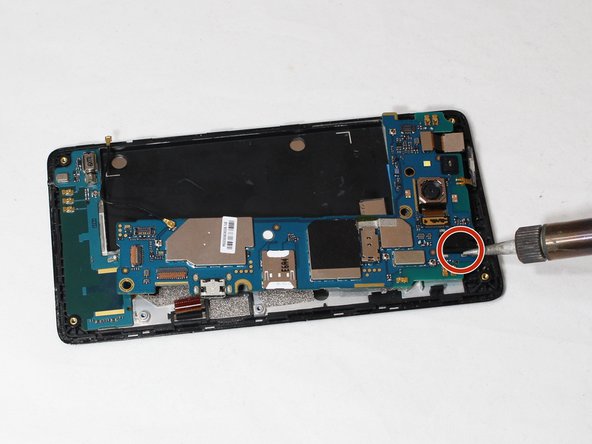
- Use a soldering iron to desolder the headphone jack from the circuit board.
- Carefully remove the old jack and position the new one in place.