Razer Blade Stealth 2017 HDMI and USB-A Port Replacement
ID: 127535
Description: This guide outlines how to replace the HDMI and...
Steps:
- Before you begin, be sure to turn off your laptop and discharge the battery down to 25%.
- Use a Torx T5 screwdriver to remove the eight, 3mm screws on the bottom cover of the laptop.
- Whenever you remove screws from the device, remember to save and label them.
- Remove the bottom cover of the laptop by sliding it away from the hinge.
- Do not force the cover up!
- Use your fingernail to pry up and disconnect the battery from the motherboard.
- Use a Phillips #00 screwdriver to remove the six, 5mm screws securing the battery.
- Remove any tape attached to the battery.
- Use the plastic spudger to pry out the battery.
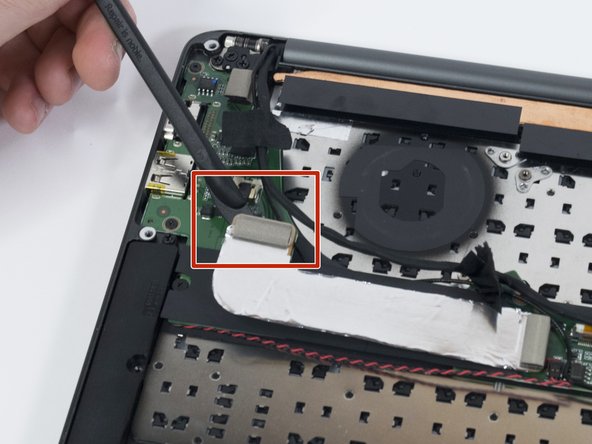
- Use a plastic spudger to lift up the press-fit interconnect cable and expose the USB-A and HDMI port module.
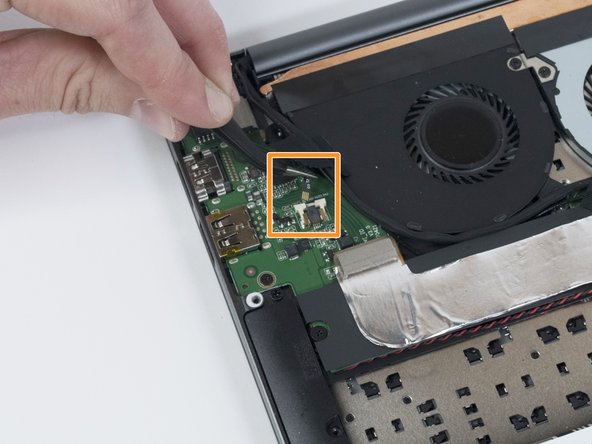
- Use tweezers to squeeze the fan's white header.
- Disconnect the fan connector by sliding it out toward the rear of the chassis.
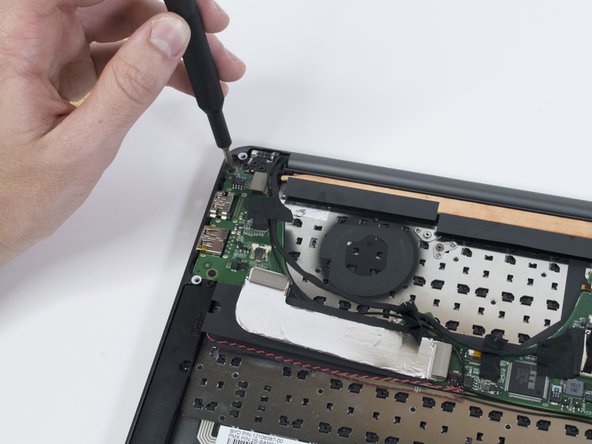
- Use a Phillips #00 screwdriver to remove the two, 3mm screws from the USB-A and HDMI port module.
- Use a plastic spudger to remove the USB-A and HDMI port module from the case.
- Do not damage the interconnect cable during removal!