Dell Latitude E7470 Motherboard Replacement
ID: 127570
Description: The motherboard is the central hub for...
Steps:
- Grab the two clips beside the RAM stick and pull them outward. The RAM stick should release.
- Remove the RAM from the device.
- Repeat this for second RAM stick
- Use the pull tab on the battery connector to lift the connector straight up off its socket on the motherboard, disconnecting it.
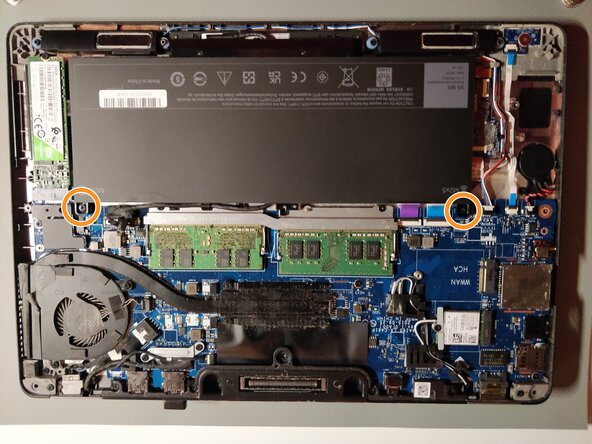
- Remove the single 4 mm Phillips screw securing the bottom left corner of the battery.
- If you are removing an extended capacity battery (see third photo), remove the Phillips screw securing the bottom right corner of the battery.
- Remove the battery from the laptop.
- After opening the backcase of the computer, remove the screws using the Phillips #0 screwdriver.
- Unplug and remove the wire from the socket.
- Remove the fan and heatsink from the laptop.
- Make sure to wipe off the existing thermal paste from the CPU and heatsink with an alcohol-soaked pad and apply a new layer.
- Remove all the screws using a Phillips #0 screwdriver.
- Disconnect all of the cables from the motherboard.
- Remove the motherboard from the laptop.