Oontz Angle 3 ULTRA 3.5mm Auxiliary Port Replacement
ID: 132263
Description: If your Oontz Angle 3 ULTRA speaker is playing...
Steps:
- Remove the two black rubber sheaths around the edges of the speaker.
- Under the symbol-marked sheath there is a white rubber covering for the buttons. Peel this away to reveal the panel underneath.
- On two corners of its triangular face there is a small divot, which allows you to use your fingernails or a pair of tweezers to grip and peel away the covering.
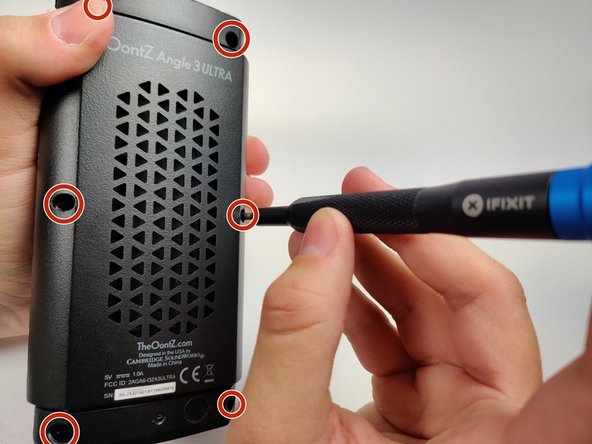
- Use a JIS #0 screwdriver to remove the six screws to expose the motherboard.
- Using a pair of tweezers, pinch and pull the rubber fillings obstructing the screws.
- Using a JIS #0 screwdriver, remove the 6 screws holding the backplate in.
- Remove the back panel off of the device.
- With your solderwick and soldering iron, remove the solder at each point, and gently pull the 3.5mm port away from the motherboard with your tweezers.
- For more information on soldering and desoldering connections, please visit the How to Solder and Desolder Connections guide.