Honda Light Duty Tiller F220K1AT715492 Clutch Cable Replacement
ID: 135653
Description: Use this guide to replace the clutch cable in a...
Steps:
- Before you begin, make sure the engine is switched off and cool to the touch.
- Pull the spark plug connector straight off of the spark plug.
- Push down on the two tabs at the top of the air filter cover.
- With the two tabs depressed, swing the top of the cover down.
- Remove the cover.
- Pull the air filter out of the housing and remove it.
- Use an 8 mm socket to remove the following fasteners securing the air cleaner housing:
- Two silver nuts
- One black bolt
- Slide the pink breather tube out of its clip on the back of the air cleaner housing.
- Use a flathead screwdriver to gently pry the black breather tube off of its connector on the back of the air cleaner housing.
- Hold the black carburetor hose in place and rotate the air cleaner housing clockwise until you can slide the hose out of its slot on the air cleaner housing.
- Remove the air cleaner housing.
- Use an 8 mm wrench to hold the clutch cable barrel adjuster in place while you use a 10 mm wrench to loosen the lock nut.
- Continue to loosen the lock nut until it is against the end of the threads.
- With the lock nut against the end of the threads, tighten the barrel until it is against the lock nut to add as much slack as possible to the cable.
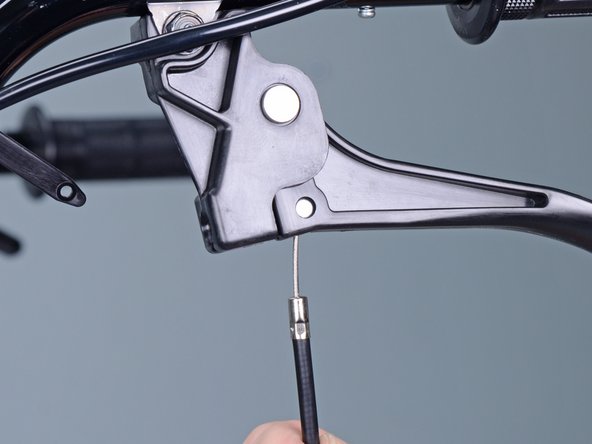
- Slide the clutch cable housing straight out of its hole in the clutch lever.
- Rotate the cable and housing through the slot in the lever until the cable is perpendicular to the lever.
- Slide the clutch cable through the slot in the clutch lever and remove it from the lever.
- Remove any zip-ties securing the clutch cable.
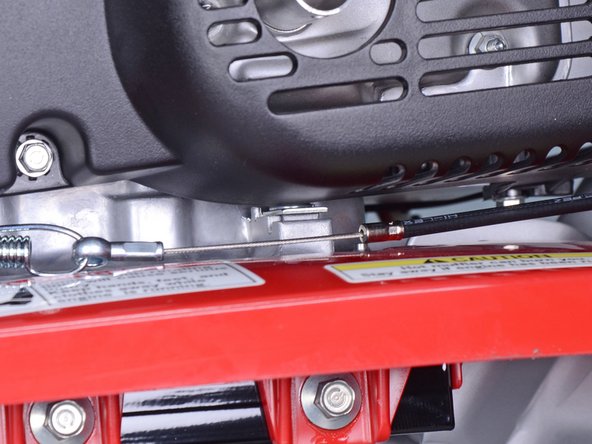
- Slide the clutch cable housing out of its bracket on the tiller.
- Slide the clutch cable through the slot in the bracket to free it.
- Slide the clutch cable off of its hook on the clutch spring.
- Remove the clutch cable.