HP ENVY x360 Laptop - 15-ee0003ca memory/RAM Replacement
ID: 139283
Description: HP ENVY x360 15-ee0003ca comes with 8GB of ram....
Steps:
- Remove the rubber strips on the bottom of the laptop. These will need to be replaced so make sure you have replacements before starting. The part number is L93198-001 but I needed to contact support for a replacement.
- There may be a transparent piece of adhesive that will also need to be removed. Remember to use plastic tools to avoid scratching the plastic cover.
- The screws are philips M2.0 and Torx5 M2.0.
- With all 6 philips screws and the torx screw removed, use a plastic pick to separate the bottom cover from the case. There are small plastic clips that need to be popped open, be gentle.
- With the pick move around the entire cover separating it then simply lift the cover off.
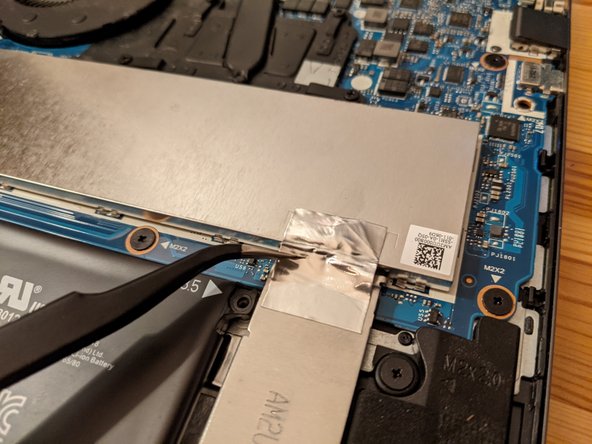
- The RAM/memory is located under the metal shield.
- Remove the metal tape, being gentle to not tear it, leave it attached to the other shield.
- Pull up the shield using a plastic tool or other sharp object. There are small metal clips all around the shield, these don't need to be touched, gently force will pop the cover off.
- With the memory exposed, actuate the clips on either side of the modules. The stick will pop free.
- Remove the sticks and put them somewhere safe. Put the replacement sticks in as the others were found.
- Use gentle downwards pressure until the clips make a sound and the RAM is all the way down, as the other RAM was.
- Replace the cover, making sure to place it back into the small metal clips
- Put the tape back so that the shield is grounded.
- Place the cover back onto the device and using gentle pressure, go all around the edge pushing until the cover clips back to the case.
- Once the cover is clipped back to the case, put the 9 screws back in.
- Then using the new rubber feet, peel off the adhesive and place them in their grove.