Acer Nitro 5 AN515-55-53AG Internal Fan Replacement
ID: 141845
Description: The fans inside the Acer Nitro 5 AN515-55-53AG...
Steps:
- Prior to beginning, be sure to turn off the device and unplug it from the power source.
- Set the device on a flat surface with the vents facing upwards.
- Use your Phillips #0 screwdriver to remove the eleven screws holding down the laptop's bottom cover.
- Remove the laptop's bottom cover using an opening tool or plastic card.
- Do not use a metal tool during this process. Doing so would risk damaging both the cover and the electrical components.
- Be gentle during removal. Do not force the cover off, or it may break.
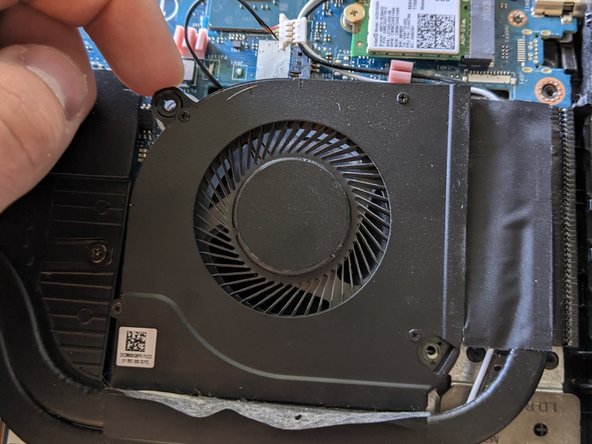
- Detach the fan's wire connector from the motherboard.
- Peel up the two strips of black tape holding the fan.
- Do not peel the tape all the way off. Leave the tape attached to the heatsink.
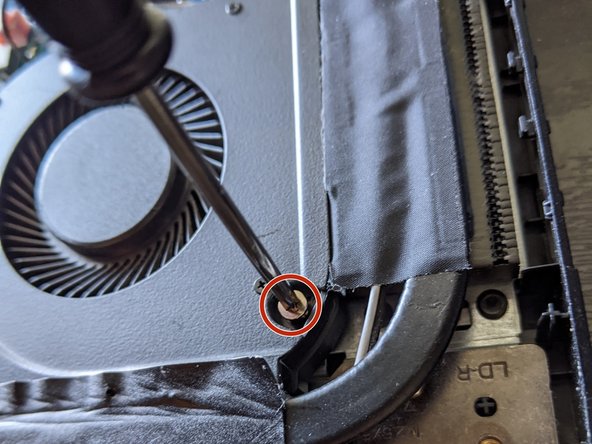
- Remove the two screws holding the fan in place using a Phillips #0 screwdriver.
- Remove the old fan by pulling it directly up.
- While the fan is out, clean the space with a cloth or a can of compressed air. Clean the fan vents and plate of any dust.