SteelSeries Stratus XL Trigger Cleaning
ID: 141970
Description: If your SteelSeries Stratus XL is having issues...
Steps:
- Remove the battery cover and the batteries from the controller.
- Remove the eight 1 mm screws from the bottom of the controller using the Y1 Tri-Point screwdriver.
- Carefully pull the back of the controller off.
- Be careful not to pull too hard damaging the wire connecting the two pieces inside.
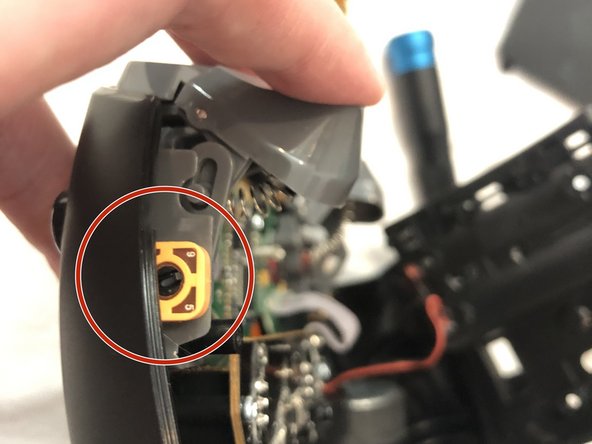
- Locate the trigger arm pot depending on which side you are having issues with on your controller.
- Depending on what issues you may be having with your controller, the screw in the arm pot may appear different. Push the trigger down a couple times and see what happens to the screw.
- If your controller is registering phantom clicks without you pushing it, the screw may be a little too tight. Turning the screw slightly to the left may solve this issue.
- If your controller is not registering when you push the trigger, the screw may be a little loose. Turning the screw slightly to the right may solve this issue.
- Make minor adjustments to the screw inside the arm pot using your flathead screwdriver.
- Dip your Q-tip in a bit of isopropyl alcohol and dab a little bit into the arm pot. Be careful not to let any leak over any other parts of the controller.