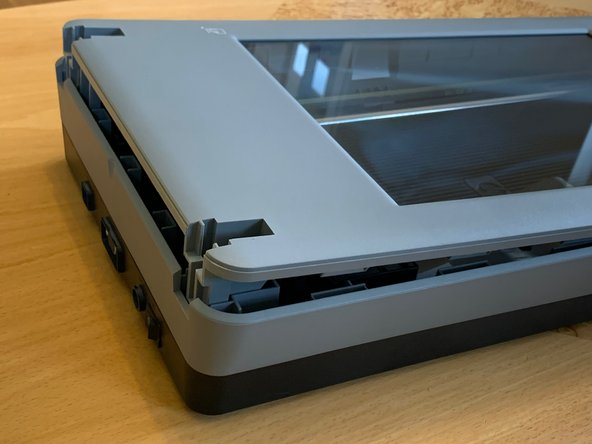
HP Scanjet 4890 Scanner Glass Underside Cleaning
ID: 144565
Description: NOTE: HP recommends that the scanner is allowed...
Steps:
- In the manual the lid is known as the TMA - Transparent Materials Adapter
- Open the lid 90° and lift straight up.
- 4x PH#2 3x8mm
- While the problem usually is to separate the top from the bottom, make sure that the top does not fall off while turning the scanner over, damaging the scanner glass.
- The top has to be lifted straight up at the front and back at the same time.
- I found Heavy-Duty Suction Cups (Pair) to work best, but due to the structure of the plastic they quickly loose their grip, so work fast.
- Alternative: Lift the top cover in the back as little as possible and use Plastic Cards to work your way to the front until you are able to get a grip of the whole top cover and lift it straight up.
- Use only glass cleaner. Avoid abrasives, acetone, benzene, and carbon tetrachloride, all of which can damage the scanner glass. Avoid isopropyl alcohol because it can leave streaks on the glass.
- Do not spray the glass cleaner directly on the glass and do not allow the cleaner to seep between the glass and the plastic. If liquid gets between the glass and the plastic it could stain the calibration strip (marked) and render the scanner useless.
- Dust will immediately begin accumulating in your scanner now that the top cover is off. Minimize the time the scanner base is exposed.
- Beware of static discharge from your fingers, hand, or tools that can damage the circuit boards inside the scanner.