HP Photosmart C4435 Ink Cartridge Replacement
ID: 144862
Description: Have you ever been in the middle of printing a...
Steps:
- Begin by making sure the printer is connected to a power source and is turned on.
- The printer is turned on when the power button and screen light up.
- This allows the cartridges to move to the front of the printer for easy access.
- Pull the handle at the front of the printer to access the ink cartridges compartment.
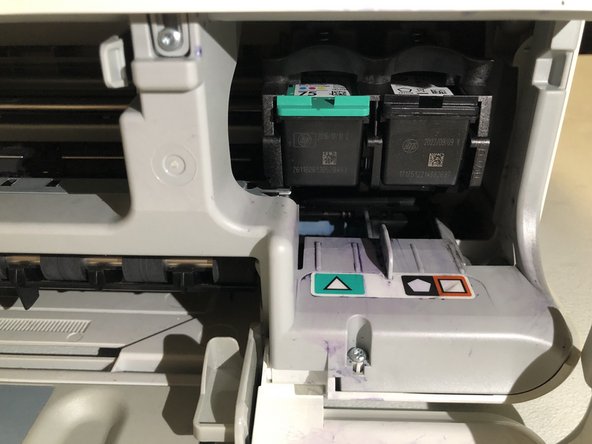
- The cartridges will be on the right side of the printer.
- Press down on the top of the ink cartridge with little force to release them.
- The teal cartridge is for colored ink. The black cartridge is for black ink.
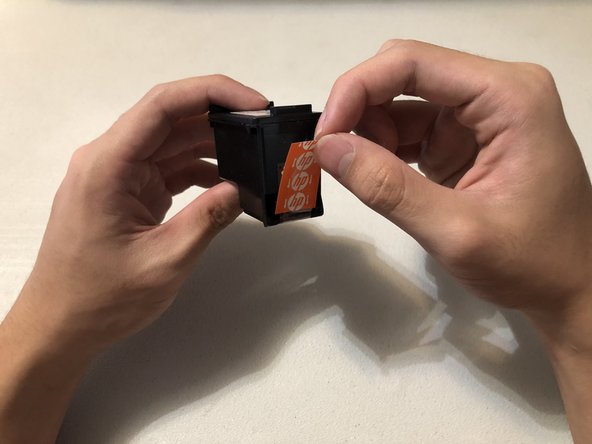
- Remove the protective sticker on your new ink cartridge before using it.
- Push the new ink cartridge forward into the slot.
- You will hear and feel the ink cartridge click into place if done correctly.
- Repeat Steps 4 and 5 for each cartridge that needs to be replaced.
- Close the ink compartment before using the printer.