Enagic Water Filter SD501 Platinum Filter Replacement
ID: 144920
Description: Learn how to replace the filter of your Enagic...
Steps:
- Turn off and unplug the machine before cleaning it.
- Clean the machine with a damp cloth or paper towel.
- Make sure nothing dirty will get in the machine during the process.
- Open the filter door by pushing the "Push" button.
- Turn the ring at the bottom of the filter to the left until you hear a "click".
- Remove the ring for now.
- Lift up the old filter and discard or recycle appropriately.
- Some water might be dripping out from the bottom of it. Have a towel ready to clean it up.
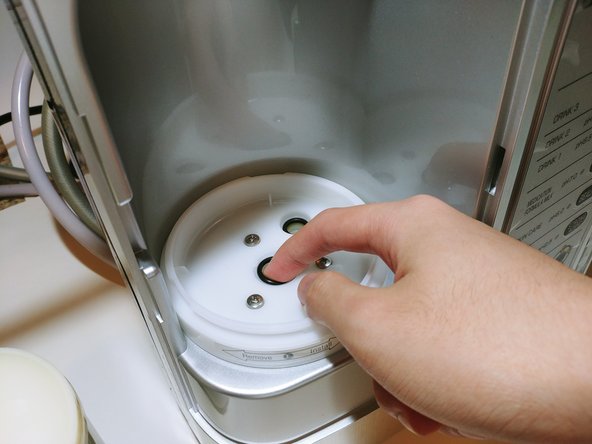
- Remove the two black rubber rings.
- They are NOT components of the machine. The new filter you have prepared should come with new ones.
- Put your new filter in it.
- Make sure that the two holes match the two popped-out parts from the filter.
- The one that is bigger should be on the middle and the smaller one should be on the side.
- This filter should be the new one that you have prepared and NOT the one that is removed from Step 5.
- Put the ring component back in.
- Turn it to your right until you hear a click.
- Make sure it is successfully locked in.
- Turn the filter back on.
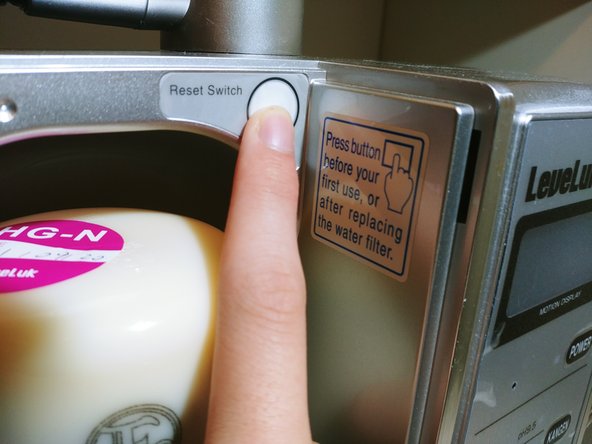
- Press the "Reset Switch"
- "FILTER RESET" should be shown on the display.
- Attach the filter door.
- There are three holes to slide the door edge into.
- And push the "push" button to close it.