Meanwell SE-600-24 Fan Replacement
ID: 144983
Description: The fan on the PSU that comes with the kit is...
Steps:
- There's 8 screws, 3 on each side and 2 on top. You need to remove to open the PSU. 1 of them is under the yellow sticker.
- Slide the cover off.
- Remove the 5 screws that hold the board in to the case, than remove the board.
- Remove the 2 screws securing the fan to the casing.
- Remove the fan.
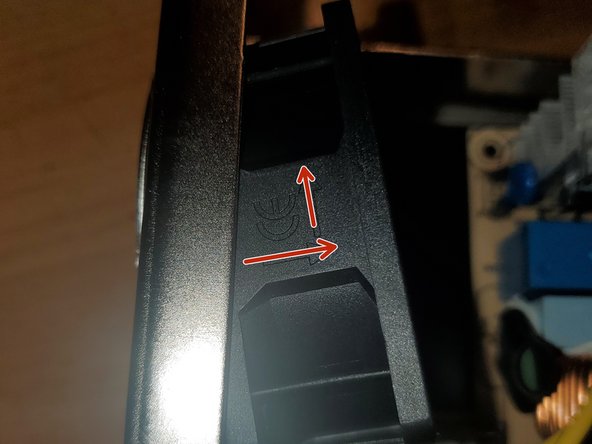
- Note the airflow arrows. When we put the new fan in we want to make sure the fan directs the air correctly.
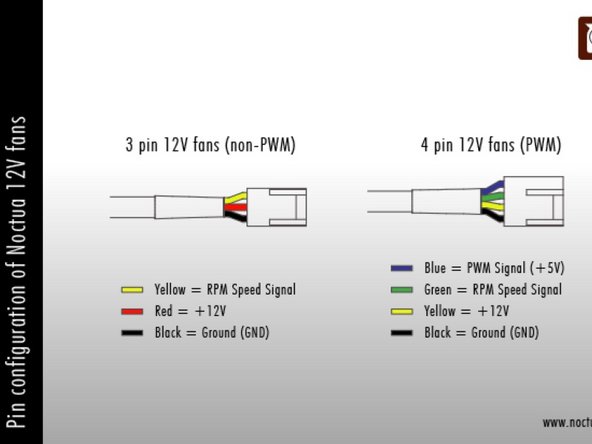
- The NF-A6x25 is a 4 wire PWM fan. Since we don't need all 4 wires cut the harness to length(12" should be enough).
- Crimp on some JST 2.54 connectors.
- 4 Pin fan: Yellow is 12v and Black is Ground
- 3 Pin fan: Red is 12v and Black is ground
- Mount the NF-A6x25 were the original fan was with the 2 screws that held in the Sunon fan. Make sure the airflow arrows point towards the board.
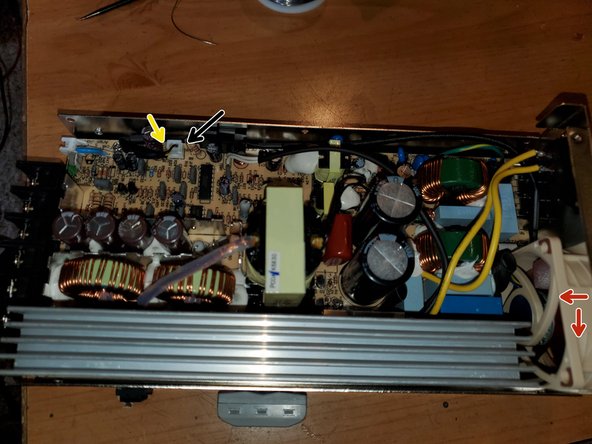
- Insert the board into the case and secure it with the 5 screws.
- Connect the NF-A6x25 fan to the board. Positive on the left and Negative on the right
- Slide the casing cover on and the remaining 6 screws