Kobo Arc K107 Screen Replacement
ID: 146682
Description: Note that this is a teardown, so reversing this...
Steps:
- Peel the back cover off of the Kobo Arc by finding the lip in the cover and pulling back on it.
- Remove the screws from the midframe.
- Use a nylon spudger to pry up the battery from the device.
- It will give some resistance as it is glued down.
- Always use plastic or nylon prying tools around the battery. Metal tools can puncture a battery, potentially causing a fire.
- Unplug the battery connector from the rest of the tablet.
- Remove the battery from the tablet.
- Remove the screws that are attached to the grey plastic layer.
- Remove the gray plastic layer.
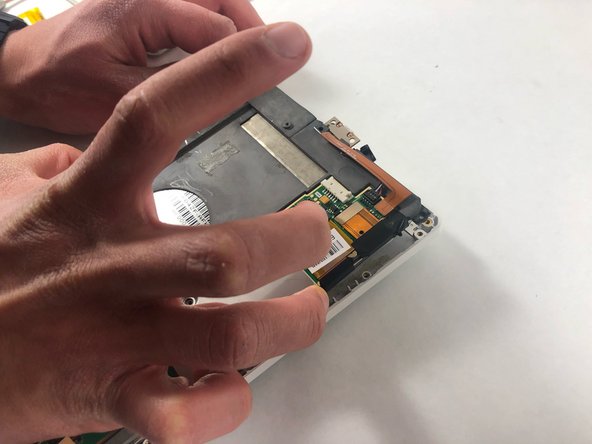
- Disconnect the speakers from the tablet.
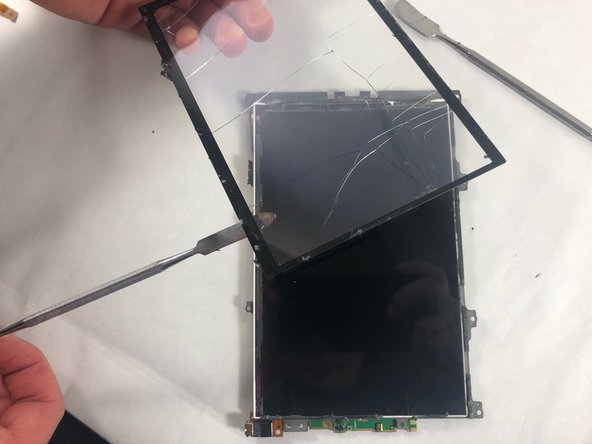
- Wedge a nylon spudger between the screen and the tablet.
- Slide the spudger around the edges of the screen and remove it from the device.