Logitech G533 Battery Replacement
ID: 146892
Description: Follow this guide to remove and replace the...
Steps:
- Shift the power switch down to the OFF position to turn off the headset.
- The blue background should be covered by the switch when the headset is turned off.
- The power switch is located on the left ear cup.
- Place the headset on your work surface so that the microphone is facing up.
- Rotate the ear cups 90 degrees so that the mesh ear pads are laying on the table and the Logitech G logo is facing up.
- Use two fingers to rotate the battery cover on the right ear cup counterclockwise.
- The indicator on the battery cover should point to the right-hand mark on the headset when the battery cover is unlatched.
- Lift and remove the battery cover.
- To reinstall the battery cover, line up the arrow on the inside of the ear cup with the one on the battery cover. Then, rotate the battery cover clockwise.
- The ear cup arrow is located on the right side of the battery compartment. The battery cover arrow is located on the inside right edge of the cover.
- The battery is still connected to the headset by cables at the bottom of the battery recess. Do not try to completely remove the battery before disconnecting it.
- While removing the battery, keep it as close to the recess as possible to prevent straining the cables.
- Use your finger to lift up the bottom edge of the battery by the tab between the two clips.
- You only need to lift the battery enough to detach it from the two clips securing it.
- Slide the battery out of the recess in the direction of its tab to remove it.
- Place the battery on your work surface so the cables face up.
- Place the battery as close to the ear cup as possible to avoid straining the cables.
- Don't twist the cables more than necessary to place the battery on your work surface.
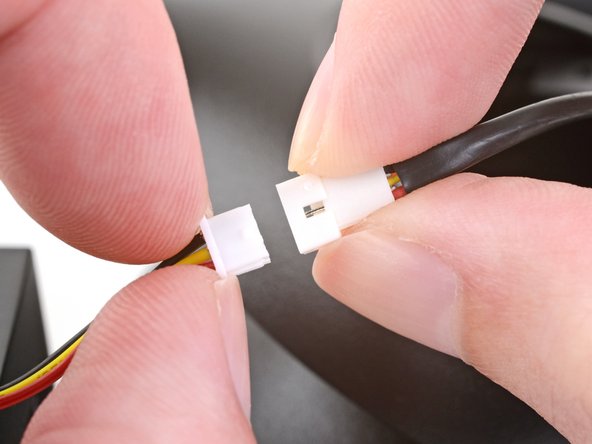
- While holding the battery connector socket, pull the battery connector out.
- Hold the battery connector socket and battery connector by their plastic frames and not by their cables to prevent damaging them.
- If necessary, pull the battery connector with a rocking motion to "walk" it out of its socket.
- You may need to use your fingernails to pull the battery connector out by the shelf near the cables.
- When inserting the battery connector, make sure it is oriented correctly. The red cable on the battery connector should line up with the red cable on the battery socket.
- Remove the battery from the headset.
- This headset has a plastic reinforced battery pack. You can reinstall the original battery if needed.