8BitDo SN30 Pro+ Controller Joystick Caps Replacement
ID: 147690
Description: 8BitDo SN30 Pro, SN30 Pro+, and Pro2 all use...
Steps:
- Place the controller face down.
- Remove the battery cover.
- Remove rechargeable battery or AA batteries.
- Remove L2 and R2 trigger buttons by pushing them away from the grips.
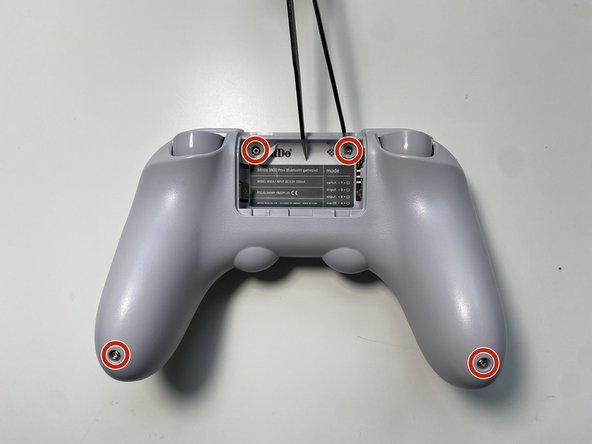
- Use Tweezers to uncover two screws under the label in the battery compartment.
- Use a T6 screwdriver to remove the four 7.3 mm screws securing the rear cover.
- At the end of each grip, pry apart the covers.
- Use fingernail or opening pick to undo the two top clips.
- One clip next to L button.
- One clip next to R button
- Undo the final clip between the joysticks.
- Carefully move the rear cover away and from the front cover. Place it to the left.
- Do not completely separate. The two halves are still attached via a white ribbon cable.
- Grab the top and pull straight up on the joystick cap. Pulling out the caps one by one.
- One at a time, orient the new cap to match the analog stick.
- Push the cap straight down onto the analog stick.
- You should hear the click of the stick button.