Google Home Hub 1st Generation I/O Daughter Board Replacement
ID: 149013
Description: If your Google Home Hub 1st Generation (GA00515...
Steps:
- Using a blue opening tool, work your way around the perimeter of the rubber foot, prying along the way until the adhesive releases.
- Be careful not to warp the speaker housing with excessive force.
- After the adhesive is broken, simply remove the rubber foot with your fingers.
- With your T5 screwdriver, unscrew the 2 silver, 5.4mm screws.
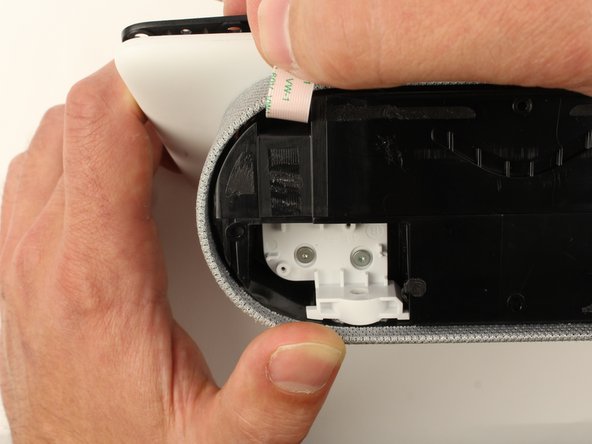
- Grasp the IO daughter board ribbon between your thumb and pointer finger, then gently pull up and toward the display to unseat the ribbon cable.
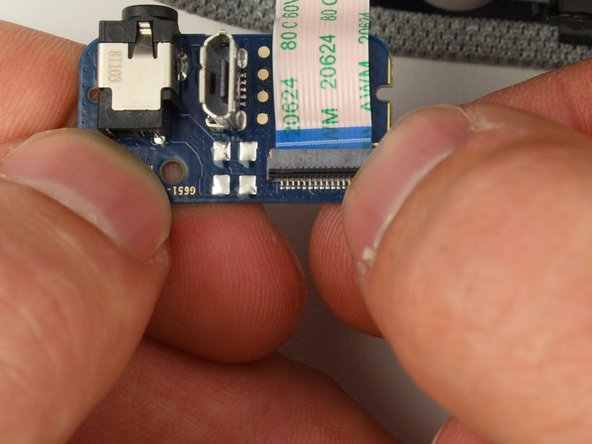
- With your fingernail or tweezers, flip the clip up ninety-degrees, so it's standing perpendicular to the IO daughter board.
- Grip the ribbon cable near the port with round-tip tweezers, and pull directly backwards, parallel to the board, to disconnect the ribbon cable. You can also use your fingers if you don't want to grab your tweezers.