Nokia Lumia 900 Front Camera Replacement
ID: 149130
Description: The front camera is an integral part of the...
Steps:
- Insert the pointed end of the spudger into the sim card port indicated by the picture. Then proceed to remove the sim card port entirely.
- Use tweezers to remove the small rod in the port indicated in the picture.
- Separate the screen from the motherboard by prying it open with the spudger along with pulling upwards with the suction cup.
- Gently pull apart the screen from the motherboard, with only the ribbons connected from the motherboard to the screen.
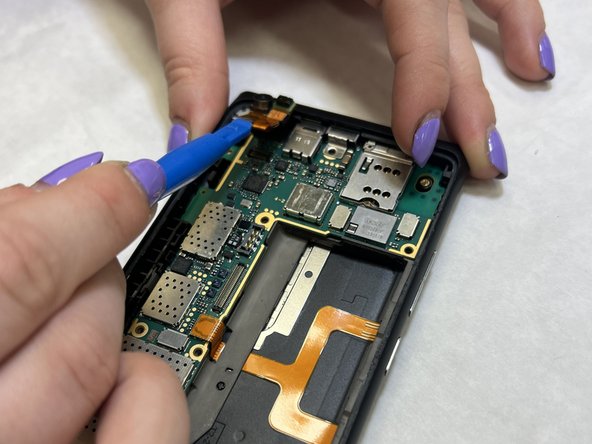
- Disconnect the No-fuss cables from the motherboard by gently prying them up using the flat end of the black stick spudger. Make sure not to bend or crease the cable.
- Remove the screen.
- Use the iFixit iOpener or another heat source to gently heat the top left corner until the adhesive under the camera softens.
- Use the plastic opening tools to carefully lift the front camera from the motherboard.