Asus Vivobook Flip 14 TP410U Motherboard Replacement
ID: 149298
Description: This guide provides instructions for replacing...
Steps:
- Unplug the power cable from the laptop and assure that the laptop is completely turned off.
- Use a Phillips #00 screwdriver to remove the eleven 12.8 mm screws from the bottom cover.
- Flip the laptop 360 degrees. This makes opening up the back cover easier and causes less harm to the components.
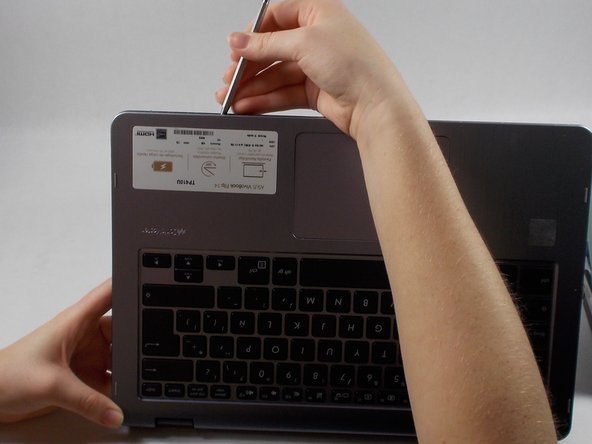
- Insert the opening tool in between the back cover and keyboard.
- Apply pressure and undo all of the "snaps" that are connecting the back cover and keyboard.
- Remove each cable connected to the HD audio, Wi-Fi card, and touchpad.
- Excessive force may cause permanent damage to the cables.
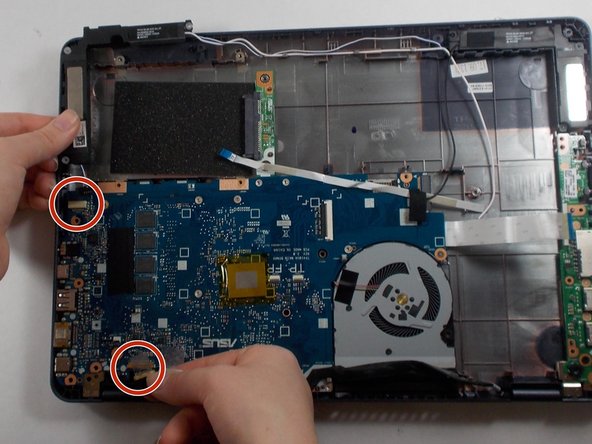
- Unscrew and remove the ten 6.4 mm Phillips #00 screws that are outlined in the photo.
- Remove the connector connecting the front display to the motherboard.
- Excessive force when unplugging each connector may cause permanent damage to the cable.
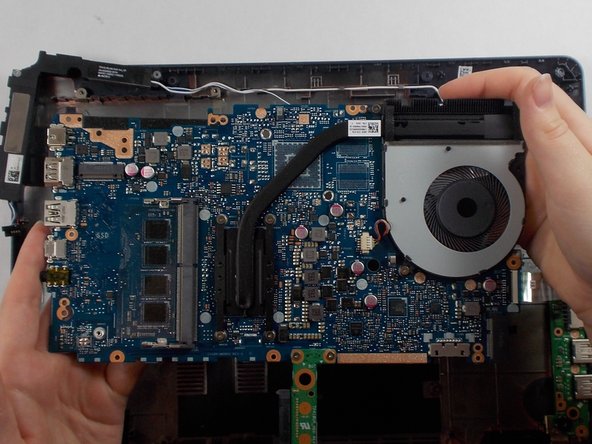
- Remove the motherboard by pulling the motherboard away from the I/O Ports on the side of the laptop.
- Excessive force may cause damages to other components in laptop.