Acer Chromebook Spin 11 R751TN-C5P3 Speakers Replacement
ID: 149303
Description: If your Acer Chromebook Spin 11 (Model...
Steps:
- Flip the Chromebook face down.
- Use a Phillips #0 screwdriver to remove the twelve 6 mm screws that secure the bottom cover.
- Insert an opening tool in the seam between the outer covers. Pushing down on the edge of the opening tool will cause the cover to lift up and reveal the internal components.
- Grab the connecting cord between the battery and the motherboard and pull towards you to disconnect.
- Remove any tape holding the battery cord down by pulling up on it.
- The battery is no longer connected to the Chromebook allowing you to lift up and remove the battery.
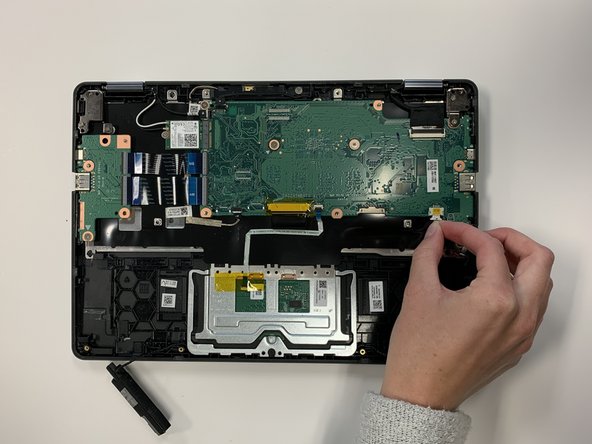
- The speakers are connected a small amount of adhesive tape. They can be pulled out by gripping them and gently wiggling them up and out.
- Unplug the cord connecting the speaker to the motherboard by gripping it on the sides and pulling.
- Use a Phillips #0 screwdriver to remove the 3 mm screw that secures the trackpad. Lift the trackpad away to expose the cord connecting the two speakers.
- Pull the cord out from the hooks to remove it.