Asus Vivobook Flip 14 TP410U LCD Assembly Replacement
ID: 149313
Description: A display can eventually die due to extensive...
Steps:
- Turn off the power and disconnected the AC cable from the laptop.
- Remove the rubber covers for the two screws located at the bottom of the screen.
- Use a Phillips #00 screwdriver to remove the two 6.4 mm screws outlined in the image.
- Excessive force may cause damage to connections.
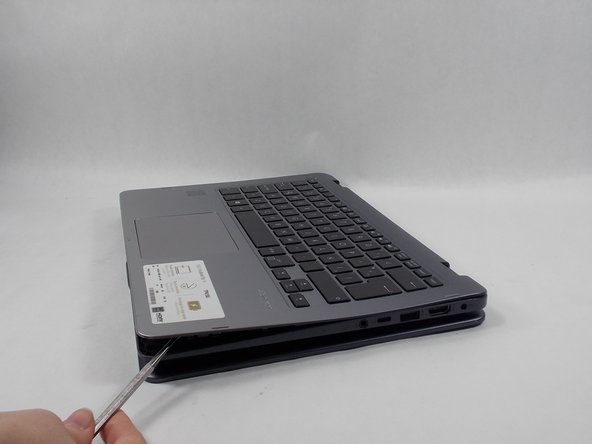
- Rotate the screen 360 degrees for ease of access.
- Place the opening tool at the corner of where the screen meets the base of the laptop.
- Pry open the screen along the edge until it is completely off the front cover.
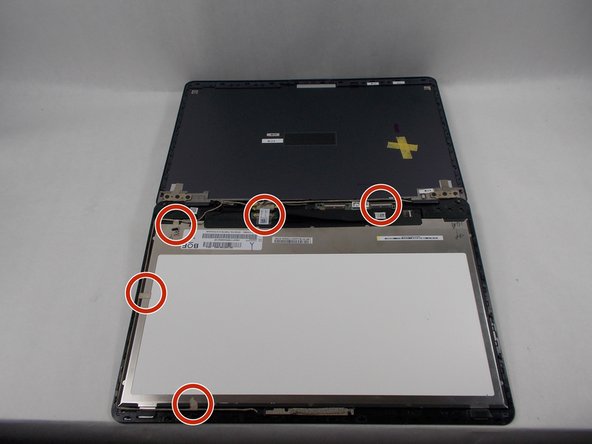
- Disconnect each appropriate connector while opening up the laptop.
- Excessive force should avoided since damage may accrue.
- Remove the cable that connects to the touch display, front camera, and motherboard.
- Remove each piece of tape that holds down each cable.
- Have the new LCD display fully unboxed and ready to be used.
- Remove the old LCD display.
- The touch screen sensor is extremely fragile, make sure to not put excessive force on the cable while assembling.