Acer Spin SP513-52N Charging Port Replacement
ID: 154730
Description: If you are having difficulty charging your Acer...
Steps:
- Power off your laptop before beginning disassembly and disconnect the device from the charger.
- Use a Phillips #0 screwdriver to remove twelve 6.0 mm screws from the back panel.
- Use an opening tool in the seam of back case and slide it around the perimeter to release the clips securing it to the top case.
- Remove the back case to reveal the internals of the laptop.
- Before replacing the charging port, unplug the internal battery from the motherboard.
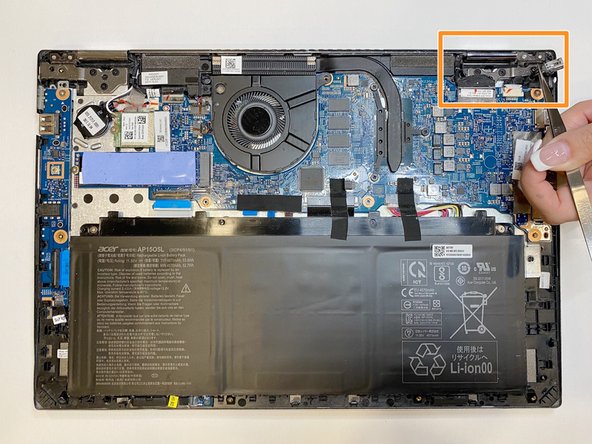
- Unplug the broken charging port from the motherboard with tweezers.
- Use the tweezer to remove the broken charging port from the motherboard.
- Take your e-waste to an R2 or e-Stewards certified recycler.
- Use tweezers to insert the new charging port securely.
- Place the back case onto the laptop and press down around the edges of the perimeter.
- You should hear the clips snap together.
- Use a Phillips #0 screwdriver to fasten the twelve 6.0 mm screws back into place.