Dell Alienware 15 R3 Wi-Fi Card Replacement
ID: 154997
Description: If you need to replace the Wi-Fi card from your...
Steps:
- Before you begin, turn off the laptop and unplug the charger.
- Flip the laptop over so that the backside is facing up.
- Use a Phillips #00 screwdriver to remove the six 13.0 mm screws from the sides of the back case.
- Use a Phillips #00 screwdriver to remove one 5.0 mm screw from the back of the laptop.
- Use the opening tool to pry the back case from the computer.
- Use the opening tool and work your way around the perimeter of the back case to gently release the clips.
- Start from the black vent for an easier removal.
- Lift the back case off of the laptop.
- Use a Phillips #00 screwdriver to remove two screws from the side of the laptop.
- Use an opening tool to release the four tabs from the hinge cover and gently pry it off.
- Use a Phillips #00 screwdriver to remove 10 screws from the chassis.
- Use a spudger or opening tool to remove the chassis and reveal the battery, fan, motherboard, and other components.
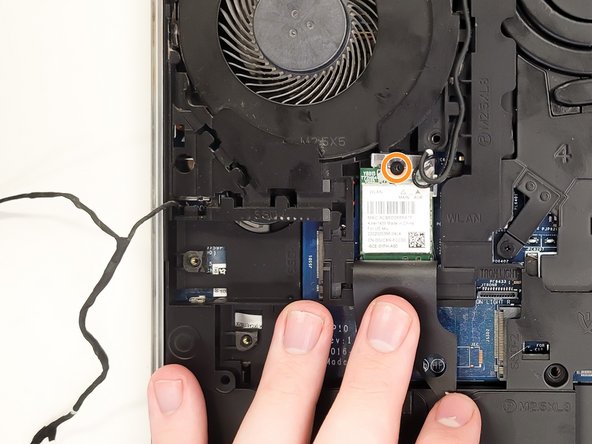
- Open the flap to reveal the Wi-Fi card.
- Use the Phillips #00 screwdriver to remove the screw securing the Wi-Fi card.
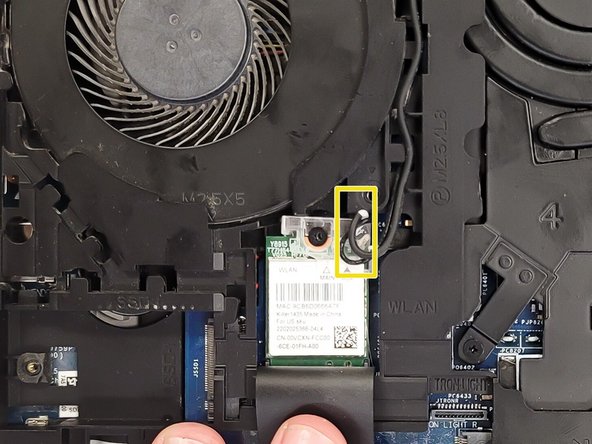
- Use a spudger to detach the coaxial cables from the Wi-Fi card.
- Be careful when detaching these cable connectors from the Wi-Fi card. The base of the connectors are prone to break off.