HP Pavilion x360 Convertible 14-dw1025nr Battery Replacement
ID: 155031
Description: If your HP Pavilion x360 Convertible...
Steps:
- Turn off the device and set it upside down. Orient the hinges away from you.
- Wedge the opening pick under the grip. Lift the end of the grip.
- Pull the grip off all the way. Repeat for the second grip.
- Use a Phillips #0 screwdriver to remove the 3 mm screw from the center bottom.
- Use a Phillips #1 screwdriver to remove the 6 mm screw from all four corners of the bottom cover.
- Use the opening pick to separate the back panel from the device.
- Begin near the hinge and carefully follow the perimeter until you have taken the pick around all four sides.
- The back panel will come loose once the pick has been around the whole edge of the device.
- Lift the panel off.
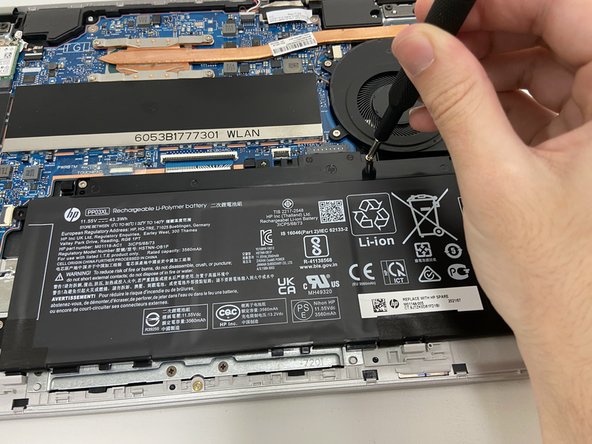
- Use a Phillips #1 screwdriver to remove all four of the 4 mm screws that secure each corner of the battery.
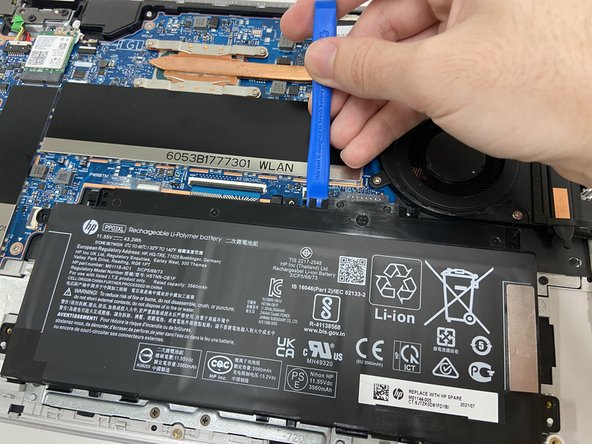
- Use the opening tool near the connector to gently apply pressure and lift the battery away from the device.
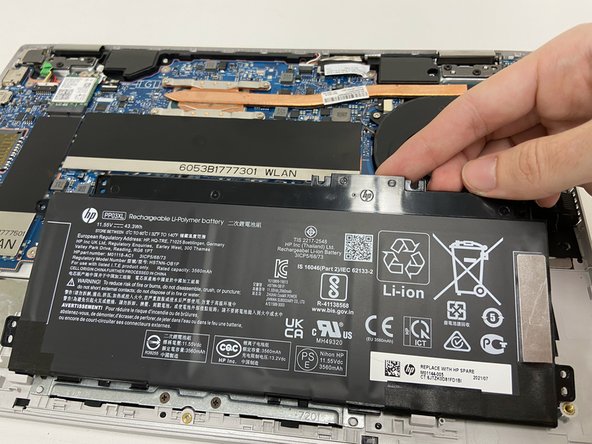
- Once loose, lift the battery from the connector side to separate it from the device.
- The stabilizer for the battery (small black part held in by the top left screw) may come loose. Leave the part in its original position.