Lenovo ThinkPad T14 Gen 3 Keyboard Replacement
ID: 157530
Description: This is a guide to replace the keyboard on the...
Steps:
- Start by disabling the internal battery in the BIOS.
- You can enable the battery again by connecting the included power adapter.
- If you choose to skip this step, make sure that the laptop is fully powered off before you start to avoid damaging anything.
- Loosen the two screws holding the keyboard in place.
- Note: These are captive screws that don't come out fully.
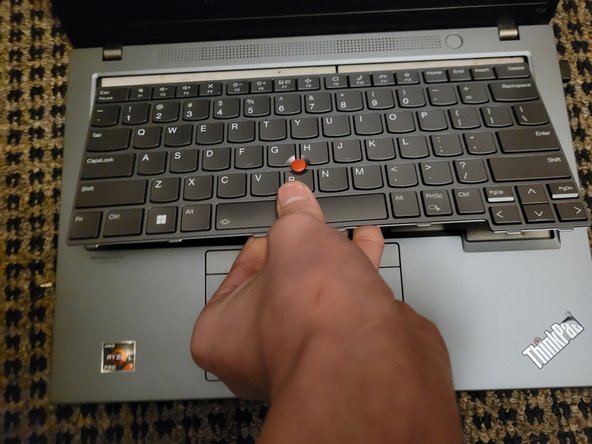
- Slide the keyboard up until the tabs at the bottom are free.
- Try not to press any of the keys or it will be difficult to slide.
- Lift the bottom slightly and pull out from the frame.
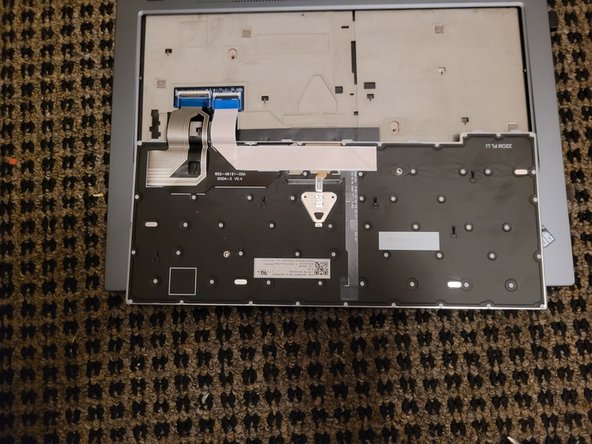
- Note: Be mindful of the fragile cables that are still attached.
- Once you have it out, fold it down on the frame.
- Using a spudger or your fingernail, carefully disconnect the two cables connecting the keyboard to the motherboard.