HP 14-dq0051dx RAM Replacement
ID: 158186
Description: This guide will show you how to replace or...
Steps:
- Turn the laptop upside down so the backside is facing up.
- Use a Phillips #1 screwdriver to remove eight screws from the back case.
- Turn the laptop over and open the screen.
- Insert the opening tool into the seam between the bottom panel and the keyboard.
- Run the opening tool along the entire seam to separate the bottom panel.
- You may hear clicking as you release the taps that secure the case.
- Once the bottom panel is separated from the laptop, carefully close the laptop and turn it upside down.
- Place both your hands on opposite ends of the bottom panel, and lift up and remove the panel.
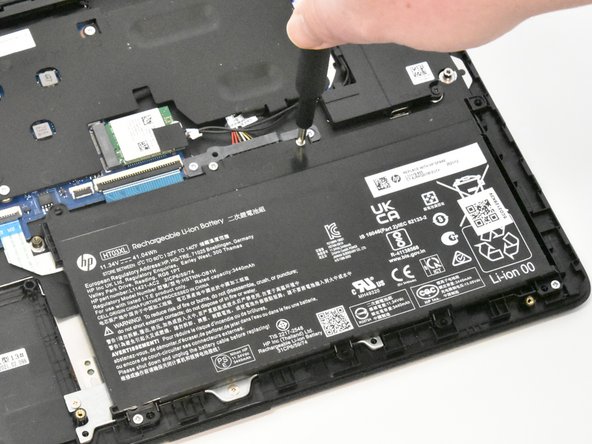
- Use a Phillips #1 screwdriver to remove the four 2.5 mm screws that secure the battery.
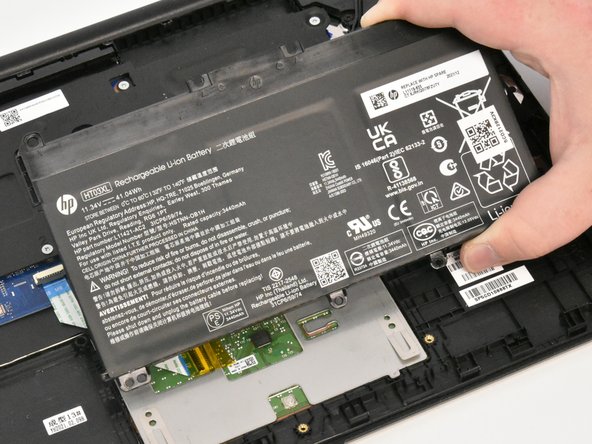
- Remove the battery from the laptop.
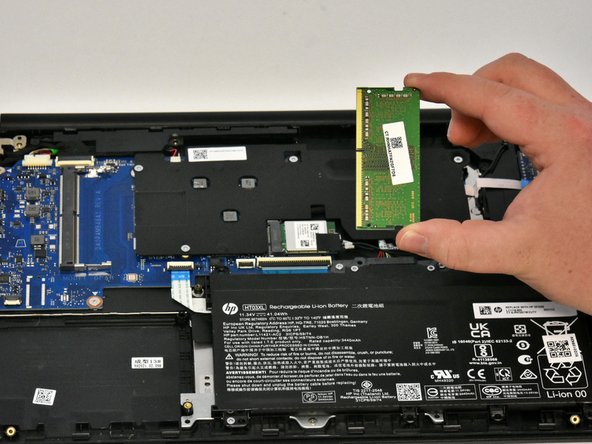
- Using your fingers, pull the metal arms (located on both sides of the RAM stick) slightly away from it.
- The RAM stick will pop up by a few millimeters.
- Remove it at an angle and not straight up so you don't damage the socket.