Dell Inspiron M731R Cooling Fan Replacement
ID: 160229
Description: Disclaimer: Make sure to turn the power off...
Steps:
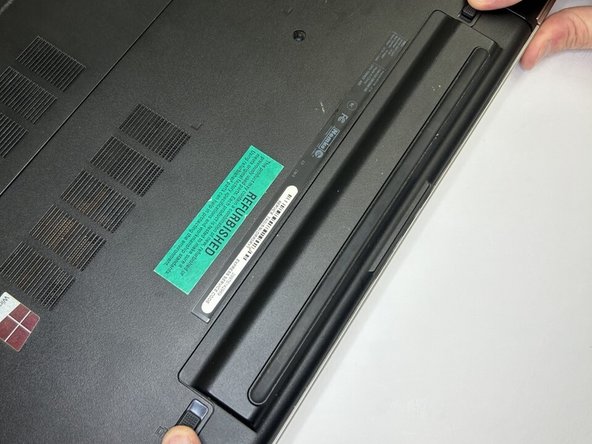
- Flip the computer over and lift the battery out of the laptop by first sliding the latches outward. Set the battery to the side
- Remove the optical drive by unscrewing the screws on the panel and then sliding the drive out from the side. Set the optical drive to the side.
- On the very bottom panel of the computer, unscrew the screws and take off the cover on the compartment housing the hard drive (your left side) and two pieces of memory hardware (your right side).
- On your right side, separate the clips on the side of each memory to remove them. Set memory to the side.
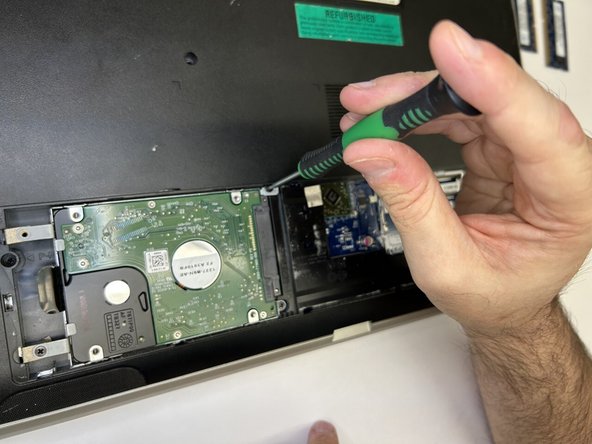
- On the hard drive side, remove two screws on the right side and one on the bottom left.
- Slide the hard drive to the left and lift it out. Set the hard drive to the side.
- Remove eleven screws from the outer frame. Four on the outermost corners, two on the optical drive, one by harddrive, two near the battery, and two screws by the memory bank.
- Turn the laptop over and open it up.
- Use the flathead screwdriver to push in between the keyboard tabs around the edges of the keyboard. Use a prying motion to encourage the keyboard to loosen out of place.
- After the keyboard comes out, flip it over and carefully disconnect the cable. Set keyboard, with the cable attached, to the side.
- Disconnect the blue and purple palm rest cables by lifting up the covers and holding them in place.
- Remove the five palm rest screws.
- Lift palm rest off the base and set it to the side.
- Remove the seven motherboard screws
- Detach the five motherboard cables. Lift the motherboard out of the base and set the computer to the side.
- Flip the motherboard over. Disconnect the fan by removing the screw and the cable.
- Finally, replace the fan.