Dell Inspiron 16-7610 Battery Replacement
ID: 160470
Description: A laptop battery is a crucial component of the...
Steps:
- Flip the device over, so the backside is facing up.
- Use a Phillips #00 screwdriver to remove four 4.00 mm screws.
- Use the Phillips #00 screwdriver to unscrew or loosen two captive screws at the right and left corner near the hinges.
- The last two screws should remain in the back case and can't be removed.
- Three of the screws are dummy screws, only screwed into retainers. They are not holding anything in and can be left in place for simplicity.
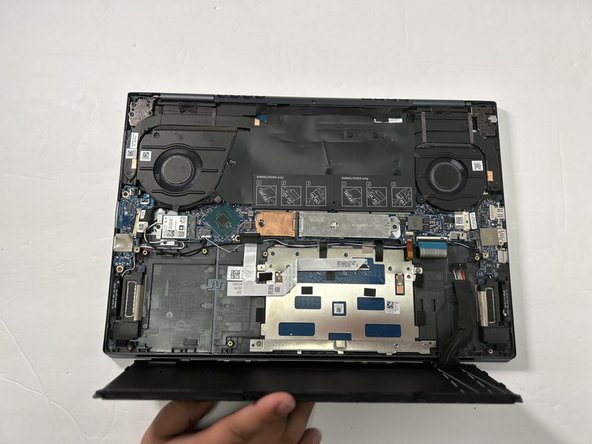
- -Use the opening tool between the seams of the top and bottom case to pry the back case off of the laptop.
- Undo the clips gently as you pry the back of the device to avoid breaking them when removing the back case.
- Remove the back case from the device.
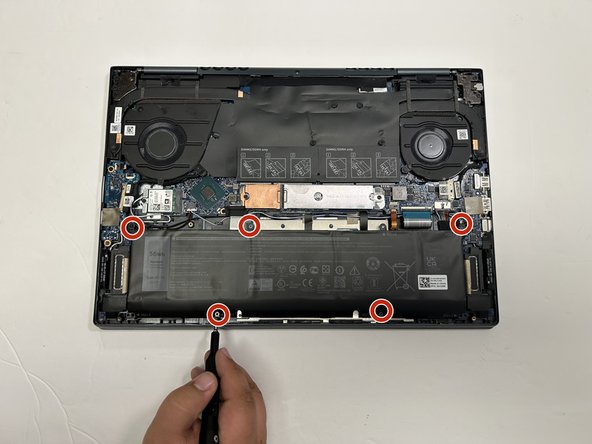
- Use a Phillips #00 to remove the five screws securing the battery to the laptop.
- Use the wide end of a spudger to push on the connector tab to slide it out of its socket.
- If that doesn't work, pull the bundled cable away from the connector in the same direction as the wires are running.
- Pull evenly on the full width of the cable so that no individual wires are overly strained.
- Use both hands to remove the battery from the laptop.