HP Pavilion 15-eh Back Cover Replacement
ID: 160479
Description: Use this guide to remove or replace the back...
Steps:
- Fully shut down your laptop and unplug all cables.
- Flip your laptop over so the rubber feet are facing up.
- The ends of the rubber feet cover four back cover screws.
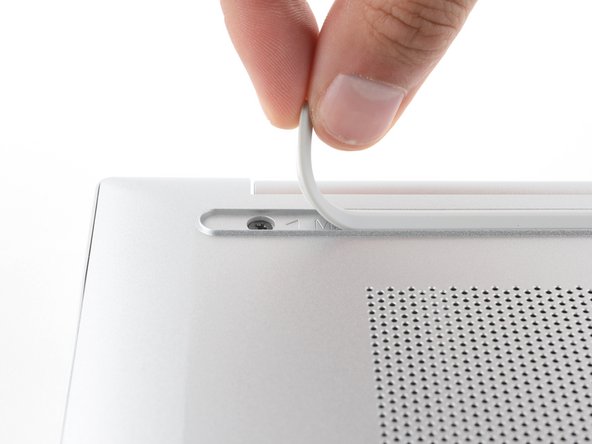
- Use an opening pick to peel up an end of the front rubber foot until you can grip it with your fingers.
- Make sure both the foot and its adhesive peel up together, as they need to be lifted up as one piece.
- Peel up the end of the foot with your fingers just until the hidden screw underneath is exposed—you don't need to fully remove the foot.
- Peel up the other ends of the feet to expose the three remaining screws.
- During reassembly:
- Press down firmly on the ends of the feet to secure them into their recesses.
- If the foot adhesive doesn't remain tacky enough to readhere, you can use double-sided tape such as Tesa Tape.
- Use a Phillips screwdriver to remove the six screws securing the back cover:
- Four larger 6.6 mm-long black screws
- Two smaller 4.8 mm-long silver screws
- Despite the standards, Phillips screwdrivers can vary in size and shape—two drivers labeled as the same size may fit differently in the same screw. Use the size that fits the most snug into the screw head to avoid stripping it.
- Tight plastic clips secure the back cover to the frame. You'll hear and feel the clips release as you work.
- Insert the flat end of a spudger between the top edge of the back cover and frame, just to the left of the right hinge.
- Pry up with the spudger to release the clips securing the top right corner of the back cover.
- Insert the flat end of a spudger between the top right corner of the back cover and frame.
- Slide the spudger down to the bottom right corner to release the clips on the right edge.
- Insert the flat end of a spudger between the bottom right corner of the back cover and frame.
- Slide the spudger to the bottom left corner to release the clips.
- Insert the flat end of a spudger between the bottom left corner of the back cover and frame.
- Slide the spudger up to the top left corner to release the clips on the left edge.
- Insert the flat end of a spudger between the top edge of the back cover and frame, just to the right of the left hinge.
- Slide the spudger towards the right hinge to release the remaining clips.
- Remove the back cover.
- To reinstall the back cover, lay it on the frame and firmly press down around the perimeter to engage all the clips.