Jabra Elite 85h Battery Replacement
ID: 160509
Description: If your Jabra Elite 85h will not charge or...
Steps:
- Remove each ear cushion by hooking your fingers along the inside of the ear cushion and pulling up and away from the ear cup.
- If the cushion does not fully release, move your hand to the opposite side and pull up inn the same manner.
- The foam inserts and backing tape are very delicate. Take your time when removing them, and be careful to not rip or tear the material.
- Using the small plastic spudger to assist, begin lifting up and removing the foam inserts with attached backing tape.
- Repeat the previous steps for the other side, removing the foam inserts with care.
- Unscrew and remove the four T6 screws holding the speaker in place.
- Repeat the previous step for the other side, removing the four T6 screws.
- Tilt the headphones over so that the speaker tilts out of the plastic holder.
- Repeat for both sides.
- Remove the plastic speaker housing from the left ear of the headphones. This should reveal the battery and motherboard.
- Using a plastic spudger, release the enclosure from the headband.
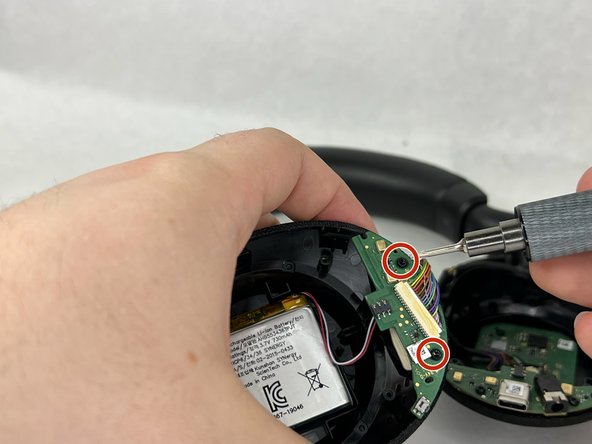
- Unscrew the two screws holding the motherboard in place and remove the motherboard from the enclosure.
- Flip the motherboard to reveal a 2-pin JST connector. Carefully unplug the connector from the motherboard and use a plastic spudger to remove the battery from the enclosure.