HP ZBook 15u G2 Heatsink Replacement
ID: 160748
Description: If your HP Zbook is overheating, or getting...
Steps:
- Turn the HP Zbook over and flip the switch at the top so the red part is visible.
- Pull the back cover down to remove it.
- Flip the two switches on the top of the battery so the red is visible.
- Lift the plastic tab at the top of the battery up to lift the battery up and out of the device
- Use a torx 8 screwdriver to remove the 11 M2.5x5mm torx screws labeled M2.5x5.
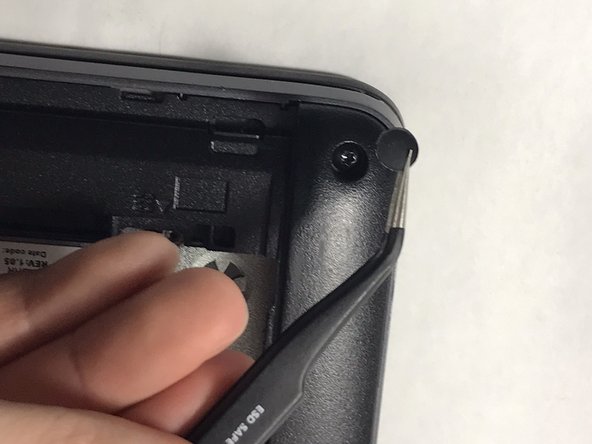
- Use a pair of tweezers to remove the rubber feet at the edges and corners of the laptop to reveal the other 8 torx screws and remove them as well
- Use a Phillips #00 screwdriver to remove the five M2.0x2 mm screws beneath the battery.
- Remove the 4 mm Phillips screws under the SD card slot on the left of the laptop.
- Lift the plastic edges around the bottom of the laptop to remove the bottom plastic cover.
- Loosen the 2 silver Phillips screws on the fan assembly.
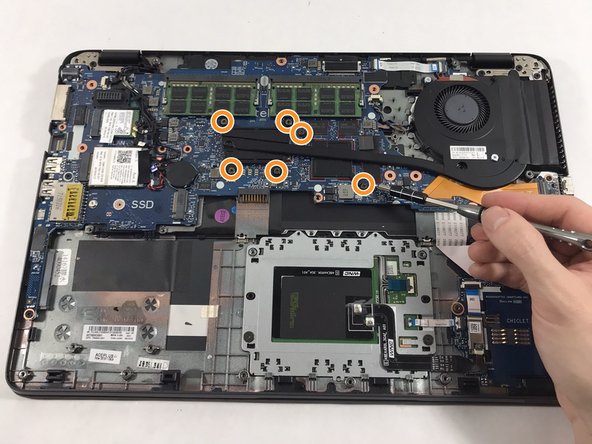
- Remove the 6 Phillips screws at the left side of the heatsink assembly.
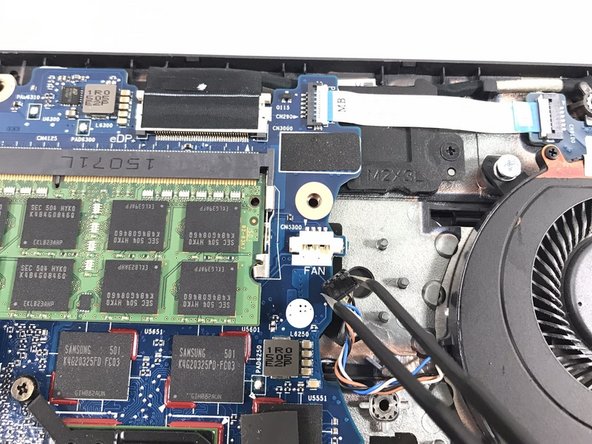
- Using tweezers, gently unplug the wire the connects the fan to the motherboard.
- Grip the heatsink assembly by the fan and lift it up to remove it.
- Use computer duster to blow away and remove any dust and particles in and around the heatsink and fan assembly.