DualSense Edge Battery Replacement
ID: 160751
Description: This guide details how to replace the battery...
Steps:
- Disconnect and power down your controller before you begin.
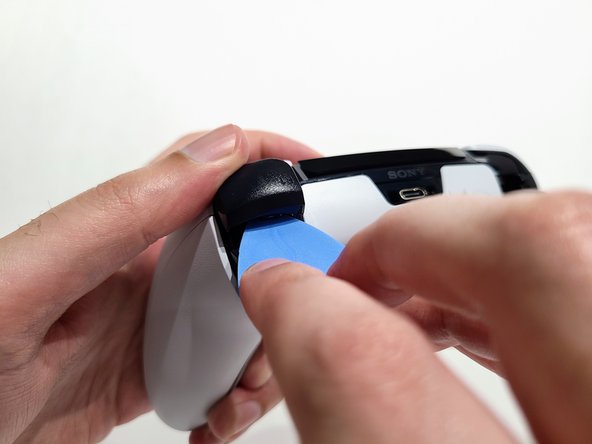
- Use the opening pick to push the release latch on the back of the controller.
- Remove the front plate.
- Raise both left and right levers next to each stick module.
- Slide both stick modules out of their slots.
- The L1 and R1 buttons are held in by two clips. If only one clip releases, move your pick to the other side of the button to release the remaining clip. Don't continue prying on one side after a clip is released, or you risk breaking the other clip.
- Use the pick to pop both the R1 and L1 shoulder buttons out.
- Use your thumb to prevent the button from flying across the room.
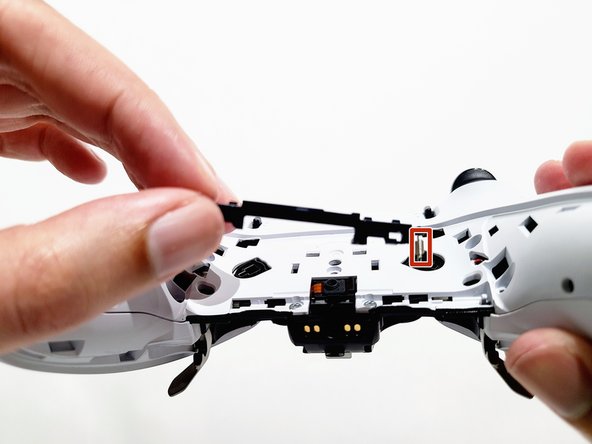
- The rear trim is held in place by fragile plastic clips. Work slowly and gently to avoid breaking the clips.
- Slide the opening pick along the left and right sides of the rear trim to release the clips that secure the trim.
- Turn the controller around and continue sliding the opening pick along the trim to release the remaining clips.
- Remove the rear trim now that all clips are released.
- If at any point the trim feels stuck, stop and look for any clips that may have re-engaged and release them with the opening pick to avoid damaging them.
- Remove the two 6.4 mm‑long screws from the L1 and R1 button enclosures (one screw on each side).
- Use a JIS J0 driver or an official iFixit Phillips PH0 driver, which is designed to be cross-compatible with JIS screws. Using a screwdriver other than an official iFixit screwdriver or a JIS screwdriver may result in stripped screws.
- Pull the lever to the left and lift up to detach it from the controller.
- Be careful with the tiny spring attached to the lever, as it is easy to lose once detached.
- Remove the nine screws securing the rear case:
- Seven 6.4 mm‑long screws
- Two 10.5 mm‑long screws
- Insert an opening pick between the front and rear casing and gently pry them apart.
- If at any point the case feels stuck, stop and look for any clips that may have re-engaged and release them with the opening pick to avoid damaging them.
- Use your hands to pull the rear case off of the controller carefully.
- The rear case holds two small plastic covers for the adaptive trigger assembly adjustment sliders. These may have come off during removal. Place them back in the rear cover now to avoid losing them.
- Use a pair of tweezers or your fingers to lift the cover from the controller.
- Slide the flat end of the cover under the plastic tab in the rear case.
- Make sure it is placed so it can move freely in its groove. The edge with the notch should be towards the middle of the controller.
- If a cover got bent during the rear case removal or reassembly process, apply a small amount of heat with a hair dryer to restore it to its original shape.
- During reassembly, you can use a small piece of painter's tape on the outside of the rear case to hold the covers in place.
- Use your opening pick to lift the battery from its enclosure and expose the wire connection.
- The battery is loose in the enclosure; hold the controller with the battery facing upward so it does not fall out.
- Place your opening pick under the low profile connector and pull it upward toward you to disconnect the battery.
- Only pry on the connector. Do not pry on the wires, as that may damage the wires.