Back Cover Screw Access
ID: 163190
Description: How to move the battery recess sticker to...
Steps:
- Unplug all cables from your controller before starting.
- Completely power off your controller.
- Due to the controller’s odd shape, it can be helpful to stabilize it as you work. To prevent damage, consider laying it on a soft surface like a cloth or towel.
- Weak magnets and two clips along the bottom edge secure the battery cover to the controller.
- Slide the battery cover away from the controller to remove it.
- If your batteries are starting to corrode, clean the contacts and replace the batteries.
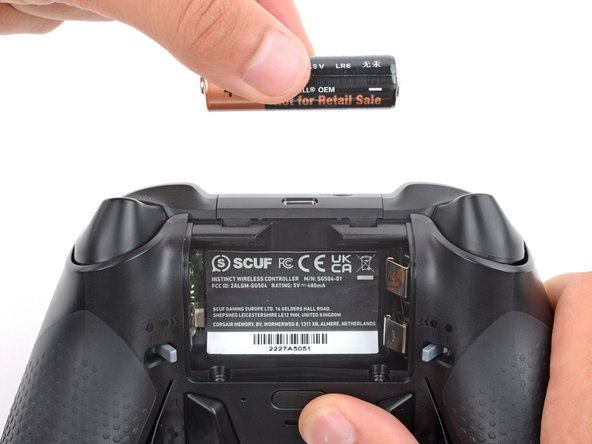
- Use your fingers to remove the batteries.
- During reassembly, insert the batteries so their positive (+) and negative (–) ends match up with the markings on the battery contacts.
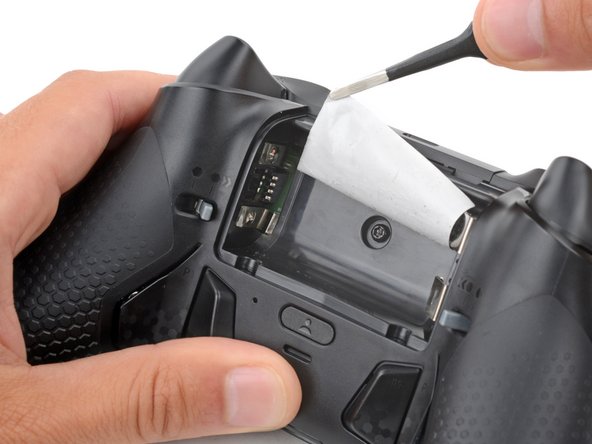
- The sticker in the battery recess hides a back cover screw.
- If you don't care about damaging the sticker, you can puncture through the center and skip the next step.
- Use a hair dryer to heat the sticker and soften the adhesive securing it.
- The sticker can be peeled without heating, but you risk tearing it.
- Use the point of a spudger to push up a corner of the sticker until you can grab it with a pair of blunt nose tweezers.
- Use your tweezers to peel up the sticker until the back cover screw is accessible.