HP Compaq Pro 6300 RAM Replacement
ID: 163544
Description: A guide to upgrading the RAM in the HP Compaq...
Steps:
- Grab the handle and pull, then lift the cover off.
- Make sure the power cord and other connectors are disconnected before beginning. You should also drain any residual power by pushing the power button after the computer is unplugged.
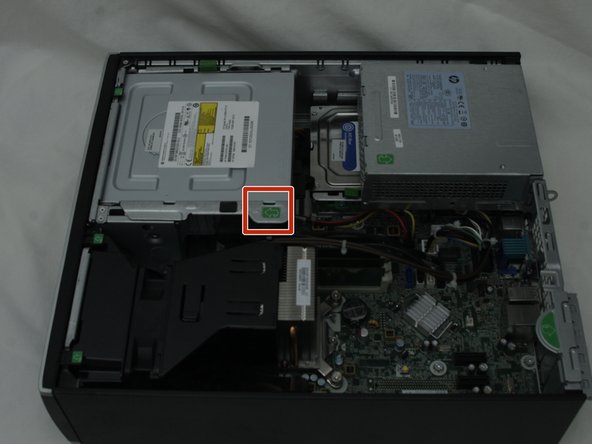
- Grab the tab and pull up the DVD drive to access the RAM.
- Put your thumbs on the two tabs surrounding the RAM sticks and push down.
- This requires a lot of pressure, so don't be afraid to give it some force.
- If you need more room, you can unplug the SATA cables that connect the hard drive and DVD drive to the computer- just make sure you plug them back in when you finish.
- Pull the module out by the top or the sides. Take care not to touch the delicate pins at the bottom and the chips on the surface.
- You may have a different number of modules depending on your configuration. If you have one or more empty slot, you can skip to step 4.
- Insert the new module, lining the notch on the module with the notch in the slot.
- Push down on the module until you hear both tabs lock into the notches.
- This requires a great deal of pressure, so after you've checked that the notch on the bottom is lined up correctly, don't be afraid to push hard.