Lenovo IdeaPad 330S-14IKB Battery Replacement
ID: 166961
Description: If your Lenovo IdeaPad 330S-14IKB does not turn...
Steps:
- Begin by turning your laptop upside down so that you can access the labels on the back.
- Remove the 10 screws from the bottom of the laptop.
- Safely store these screws in a place where you won't lose them, such as a magnetic pad.
- (Silver, 5.8mm Philips #0)
- Slowly and carefully remove the back panel from the laptop.
- Be cautious and use wedges if needed to avoid damaging the panel.
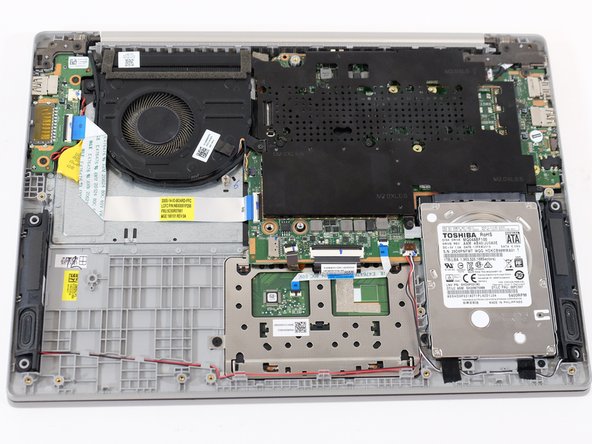
- Locate the battery in the bottom left corner.
- Remove the 5 screws that secure the battery in place.
- (Black, 3.45mm Phillips #0)
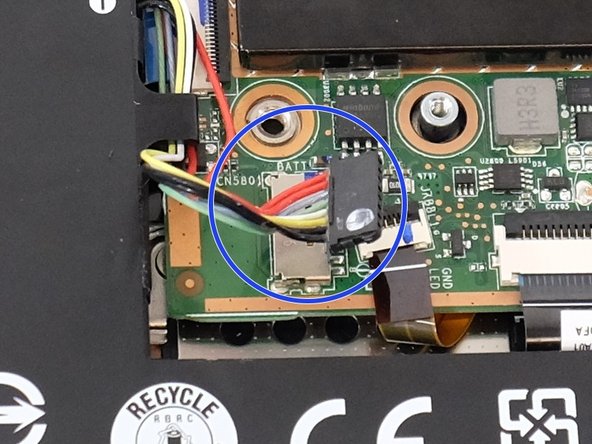
- Near the positive and negative symbols on the battery, you'll find a wire connected to the motherboard.
- Gently unplug this wire.
- There is a wire clipped to the side of the battery next to the hard drive; unhook this wire.
- With the wire disconnected, remove the old battery.