Logitech G920 Driving Force Back Pedals Replacement
ID: 166989
Description: This replacement guide will help you in...
Steps:
- Locate the pedal you need to replace.
- Use a Hex 2.5 screwdriver or Allen key to remove the two 30 mm center screws in the pedal.
- Remove the pedals from their stand.
- Repeat steps 2-3 until all pedals needing replacement are removed.
- Remove the 12 12mm screws from the bottom of the device using a Phillips #1 screwdriver.
- Remove the eight 12 mm screws from the bottom of the device with a Phillips #0 screwdriver.
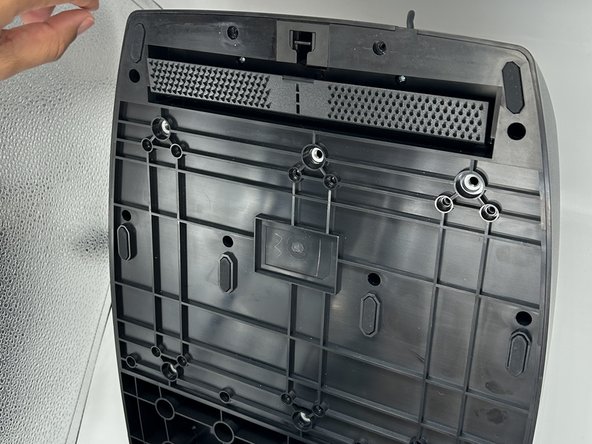
- Push down the switch found in the hole at the top of the underside of the pedal board.
- This opens the carpet-hold to access more screws.
- Remove the two 14 mm screws behind the carpet hold with a Phillips #0 screwdriver.
- Remove the pedal back that matches the pedal front removed in step 3 .
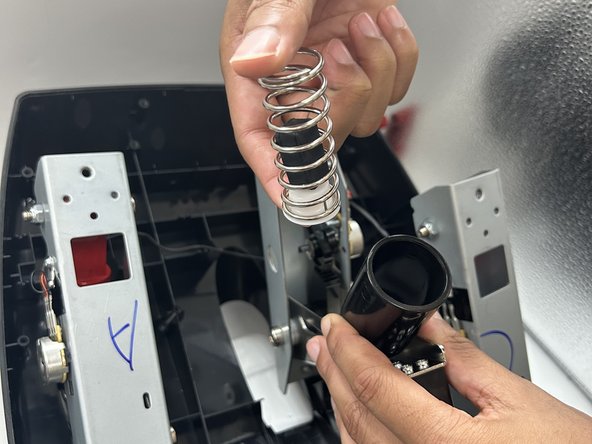
- This image is not upside down. When removing the back panel piece, the lettering on the inner pedal mechanism will appear this way.
- Remove the washer and bolt at the top of the red piece on the pedal back.
- Remove the red piece, spring, and block within the pedal back.
- Replace the necessary part.