Contixo V9 Motherboard Replacement
ID: 167042
Description: The following instructions will guide you...
Steps:
- Find the separation line between the front and back side of the device on the outer edge of the tablet.
- Use the plastic opening tool to pry apart the tablet, lifting the face off.
- Remove the three screws along the perimeter of the motherboard using the Phillips #000 screwdriver to unscrew.
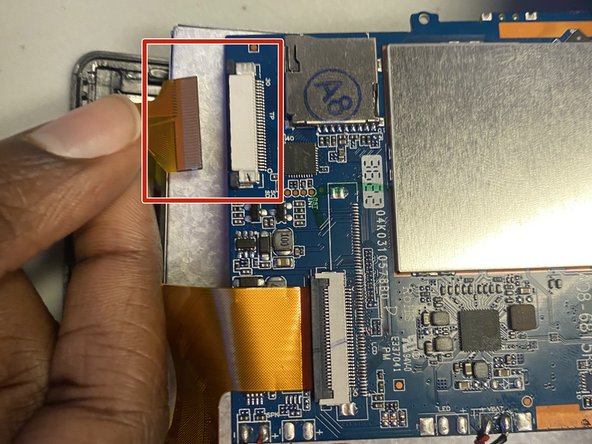
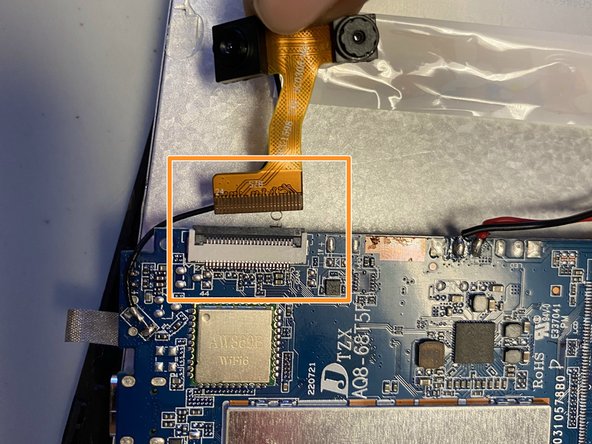
- Locate the three golden ribbons along the perimeter of the motherboard.
- There are two dark tabs; pull each away from the cream connection port. Once tabs are in open position remove the gold ribbon.
- Flip up the dark tab and pull the gold ribbon away.
- Do not pull the the cables harshly as it could rip the ribbon.
- Reference this guide for more help with attaching or detaching cables.
- Locate the battery on the opened tablet.
- Use the spudger or one of the blue iFixit tools to lift the battery from the base of the tablet.
- It is possible to use your hand to pry the battery away from the base of the tablet but not recommended.
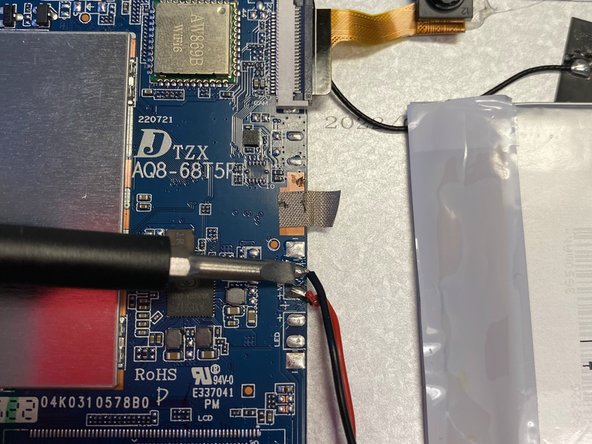
- Detach the motherboard from the battery by pressing the soldering tip tool to each of the three connection points.
- Exercise caution when desoldering the battery.
- The tool located in the pictures is not the soldering tip tool but rather used for reference of where to detach.
- Reference this guide for more help with soldering and desoldering the connections.
- Remove the motherboard from the base of the device. Switch with replacement.