HVAC Filter Replacement
ID: 167261
Description: This guide is for filter replacement of air...
Steps:
- Observe your air conditioning vent. If the filter appears to be dirty or damaged, then it is time to change it.
- Remove the screws on the vent cover. There should be a minimum of 4 screws in each corner of the vent.
- The screws in this vent are phillips hex head screws that are 1 3/4 in. long.
- Grab a screwdriver with a hex head attachment to remove the screws. Grab the screwdriver and place it on the head of the screw. Twist in a counterclockwise motion until the screw is removed. Repeat for every screw.
- Remove the vent cover to access the ventilation filter.
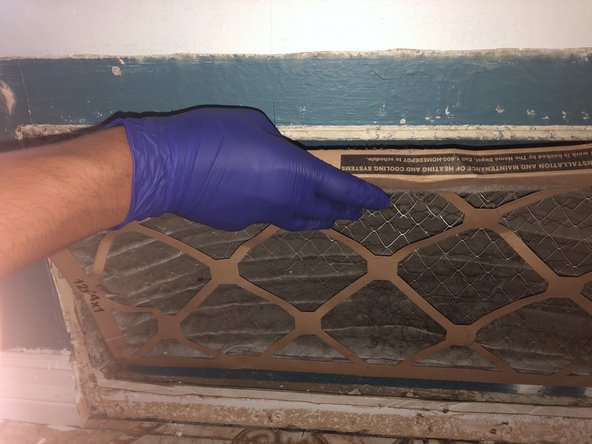
- Optional: Put on a latex glove on the hand that you will use to remove the filter.
- Remove the filter carefully.
- Make sure to remove it slowly so that the dust does not come of it.
- Dispose of the old filter in a waste bin.
- Buy a Honeywell Air Filter from Home Depot and make sure to buy the filter with the correct dimensions.
- The dimensions for filters will vary depending on the dimensions of the vent.
- In this case, my vent was 14x25x1 and thus needed a filter with the same dimensions.
- Place the new filter into the vent opening. Make sure that it is facing the right direction.
- There will be an arrow on the side of the filter showing which way to place it.
- Place vent cover.
- Grab the same screws that were taken out at Step 3 and use them to secure the vent cover.
- Place the screwdriver on the head of the screw and twist in a clockwise motion until screw is secure.
- Repeat for every screw.
- Turn on your air conditioner to make sure the filter does not move.
- If the filter does not move, then you have successfully replaced the filter of your air conditioner.