Turtle Beach Stealth 600 Gen 2 Battery Replacement
ID: 167268
Description: If the headset does not turn on ( after...
Steps:
- Pull the left ear cover off gently in order to expose the screws
- Make sure to pull on the ear cover gently since it can easily rip
- Use a Phillips #00 screwdriver to remove the four 2 mm screws from the earpiece.
- Once the 4 screws are off , lift the earpiece gently to reveal the inside
- However, there are wires that are connected so you have to be very careful to not damage those wires
- Use a Phillips #00 screwdriver to remove the three 3 mm screws from the board.
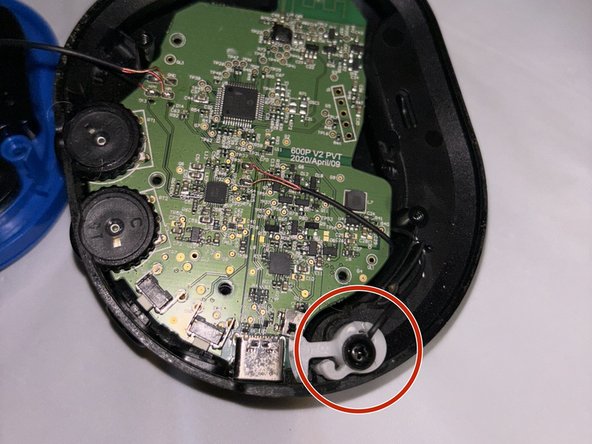
- In order to lift the board, we will also have to unscrew the microphone piece .
- After you unscrew, you can gently lift the white component up
- You can use tweezers which are optional
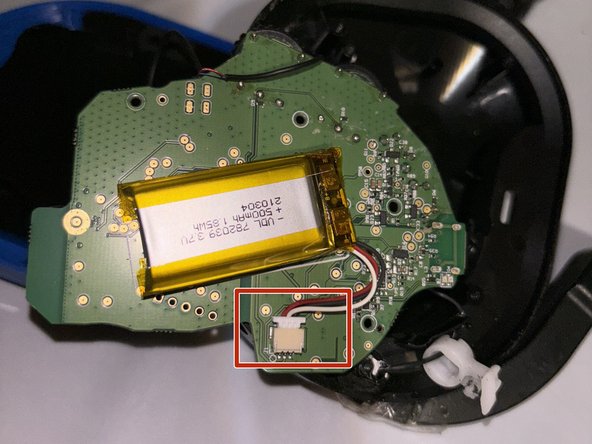
- Now gently pry the board from every angle and lift the board to reveal the backside and the battery
- You can use any tool to pry the board open, I used the screwdriver
- Once the battery has been revealed , unclip the old battery and remove it from the board
- You may use a knife or any other tool to remove the battery from its place since it has tape/glue
- Once the battery has been removed, clip in the new battery into the white component and place the battery into the board
- The new battery will either have a sticky side or tape to place onto the board