Samsung UBD-M8500 Optical Drive Replacement
ID: 167296
Description: If you find yourself needing to replace the...
Steps:
- On the back of the device, remove the three 8.1 mm screws with a Phillips #1 screwdriver.
- From the back lift the case of the device upwards then forward, releasing the clips from the front.
- Using two fingers in a pinching motion, release the wire from the clip that is attached to the outer shell and disconnect it.
- Do not pull on the wires.
- Remove the cover of the device.
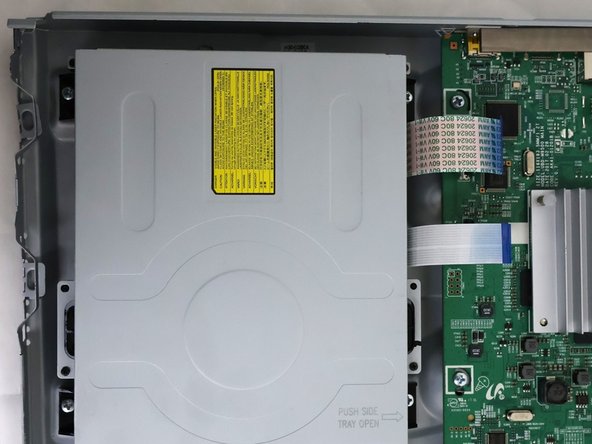
- The disc drive is located to the right of the unit, it will be a large metallic rectangular box.
- There are two blue ribbon cables located just to the right of the optical drive. Remove the cables by unhooking the thin clip on the motherboard and then pulling them gently from their sockets.
- Use a Phillips #1 screwdriver to remove the four screws securing the optical drive.