Doov v15 Sim Card Replacement
ID: 167301
Description: A guide on how to replace a Sim Card inside of...
Steps:
- Use the Jimmy to crack open the phone's back cover. Slide it under an edge of the phones back cover and carefully loosen the edge. The casing should pop open slightly.
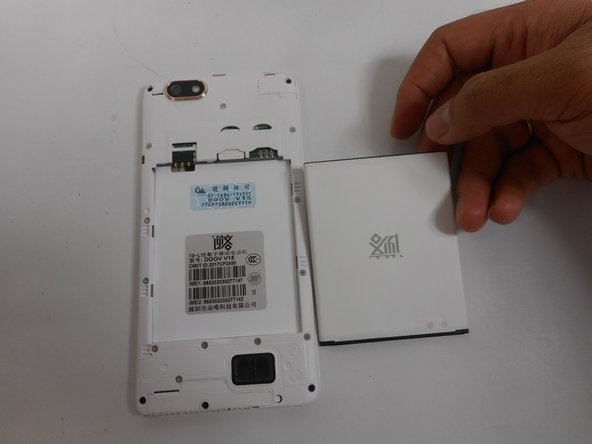
- Use an Ifixit opening tool and slide it around the phones back cover. The Sim Card will be visible above the battery to the right.
- Disconnect the battery: Once the back casing is removed, the battery will be visible. Use the ifixit opening tool to remove the battery. Place the ifixit opening tool at the top of the battery and pull it back, or simply use your hand to remove it.
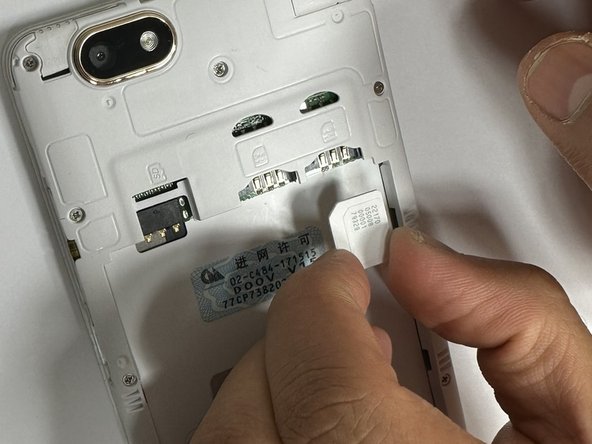
- Use the Ifixit opening tool and place it in the hole above the SIM card slot and push it downwards, so the SIM card slides downward. Place the iFixit opening tool on the now more visible SIM card and slide it down for an easy removal.
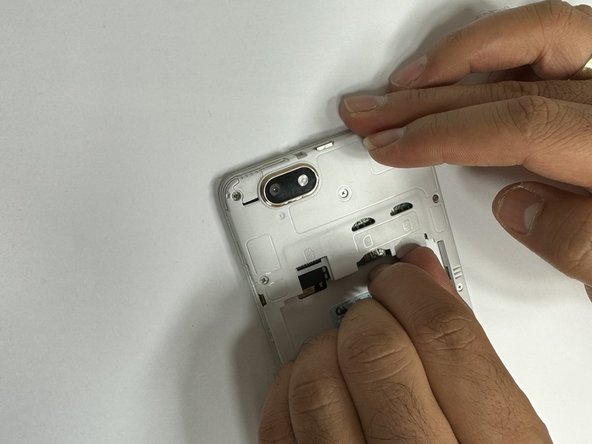
- Place the new SIM card in the slot by sliding it back in the slot, as shown in the figure (facing the sim number and code upward.)