Samsung Chromebook 4 Plus XE350XBA-K05US Device Speakers Replacement
ID: 167311
Description: If your Samsung Chromebook 4 Plus...
Steps:
- Hold the power button on the keyboard until the device powers off.
- Close the device and flip it over.
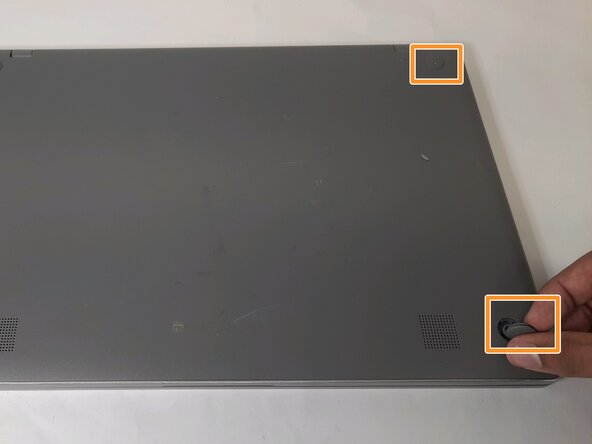
- Remove the four rubber sockets on each corner of the device with your fingers.
- Remove the four 4.6 mm screws with a Phillips #00 screwdriver.
- Starting near the hinges, use a metal spudger to gently pry the back off. Continue along the edges until the back is completely detached.
- Locate a long gray box labeled “Laptop Battery.”
- Remove the two 4 mm screws with a Phillips #00 screwdriver.
- After removing the screws, remove the gray piece labeled “bracket battery BA61 - 03983A.” This piece is located over the golden band connecting the battery and the motherboard.
- Unplug the golden band that connects the battery to the motherboard.
- Use the Phillips #000 screwdriver to remove the four 4 mm screws holding the battery in place.
- Follow this step if your Chromebook's left speaker is broken.
- Face the hinges of the motherboard toward you.
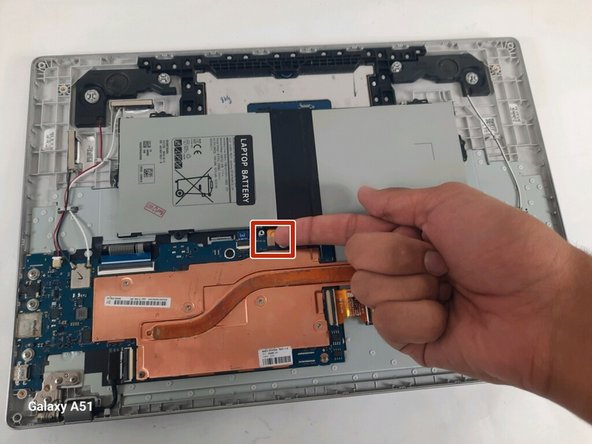
- Pull out the white plug-in piece indicated in the photo.
- Remove only the red and black wire from the wire guide, and ensure all other wires are in place.
- Lift the black L-shaped piece called “>PC+ABS<S1-C(L) R0.0 BA96-07326A.”
- Follow this step if your Chromebook's right speaker is broken.
- Face the hinges of the motherboard toward you.
- Pull out the white plug-in piece indicated in the photo.
- Remove only the white and black wire from the wire guide, and ensure all other wires are in place.
- Lift the black L-shaped piece called “>PC+ABS<S1-A(R) R0.0 BA96-07326B.”