Disassembling Xiaomi ROBOROCK S6 Clean Motor Filters
ID: 169227
Description: I get error messages that filer is full or wet...
Steps:
- All tools you will need is ph1 and ph2 driver and flat spudger
- Remove Brush and its cover
- Remove dust container (opposite side)
- On second image is the internal filter that we trying to get to
- To remove bottom cover just remove all visible ph2 screws (one of them is covered with white warranty sticker)
- All are the same size and length - you can put them aside. Inner screws are different ones
- Top cover is clip on only. Check the image for locations. This is probably only risky part of disasembly
- Left and Right edge ones have little larger holes - that helps when you try to put it back
- I was not able to fully open bottom cover even after removing all screws until i removed LiDAR also. Its hard to believe but to open bottom you must remove it from top
- 3 unique screws are hidden under white rubber
- 2 smaller screws are holding hinge and are same screws as rest LiDar uses - dont chage with screws from bottom - they are same diameter but shorter
- 4 Screws are inside cover
- Bumper screws are smaller than rest of them, ph1 size recomended
- Side Brush (there is one screw below it need to be removed)
- Main Brush with motor assembly
- (Optional) Both wheels has 3 screws, you will need little longer screwdriver
- (Optional) After remove wheel, you can rotate the hole to see screws
- Top cover reveals filter, motor, speaker and main motherboard
- Motor is on bottom
- Speaker
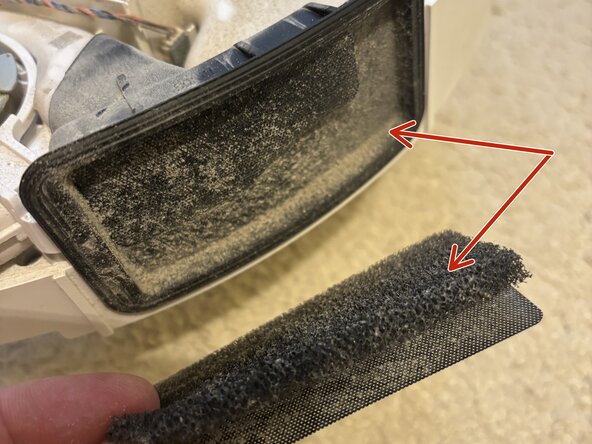
- Filter can be cleaned
- Sensor for presence of filter in dust bin
- I was expecting much more dust in here, but probably will help a little in long therm