Lenovo Legion Y530-15ICH Thermal Paste Replacement
ID: 169637
Description: If you notice your Lenovo Legion Y530-15ICH...
Steps:
- Remove the five 7 mm screws using a Phillips #1 screwdriver.
- Remove the six 4 mm screws using a Phillips #1 screwdriver.
- Unplug the battery by gently pulling the wires using either your fingers or a pair of tweezers.
- When using tweezers, avoid using the metal tip to pull the wires, as it might cause damage. Instead, hold the wires flat with your tweezers and gently pull them in the direction of the battery.
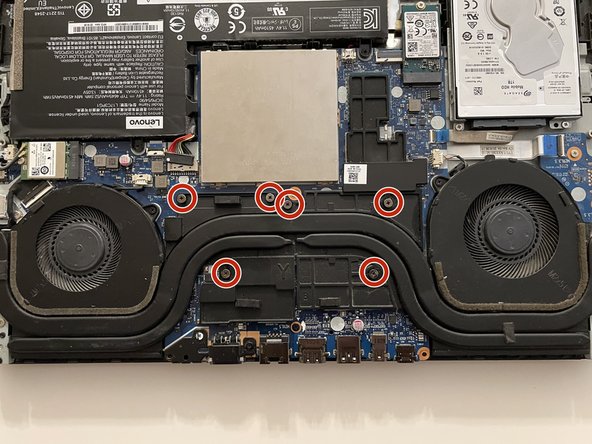
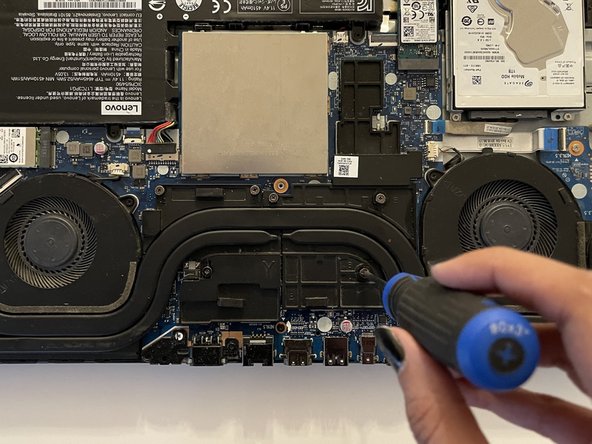
- Loosen the 6 spring screws with a Phillips #1 screwdriver.
- The spring screws will not fully detach from the heatsink; continue loosening until you hear a "click" noise.
- Gently lift up the heatsink and set it aside.
- Clean the bulk of the old thermal paste with a tissue dipped in high-concentration isopropyl alcohol.
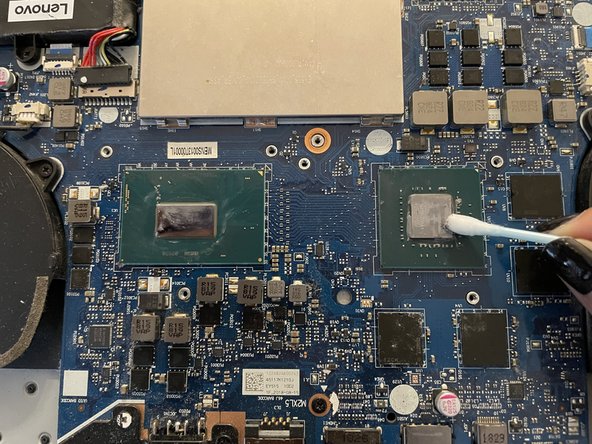
- Clean the remaining old thermal paste stuck in the crevices with cotton swabs dipped in high-concentration isopropyl alcohol.
- Clean the backside of the heatsink with cotton swabs dipped in high-concentrate isopropyl alcohol.
- Apply the new thermal paste, using enough to ensure most of the pad would be covered when we spread it later.
- If you have a spreader, use it to spread the thermal paste evenly over the pads. If not, don't worry; when we put back the heatsink, the thermal paste will spread by itself due to the applied pressure.
- Put the heatsink back on and tighten the spring screws in the 1 → 6 order as marked on the surface of the heatsink.
- Plug the battery back in by gently pushing it back into the slot.
- Put the back cover in place and tighten all the 11 screws back on in a clockwise direction. Don't screw them too tightly to avoid damaging the plastic.