Lenovo 300e Chromebook 2nd Gen Trackpad Replacement
ID: 169726
Description:
Steps:
- Make sure you power off your Chromebook first as you will be disconnecting the battery!
- Remove all 9 screws on the back of the Chromebook with a Phillips #0 screwdriver
- The screws circled on this Chromebook's back casing are all identical!
- Use an opening tool such as a spudgerand carefully work your way around the laptop to remove the back cover
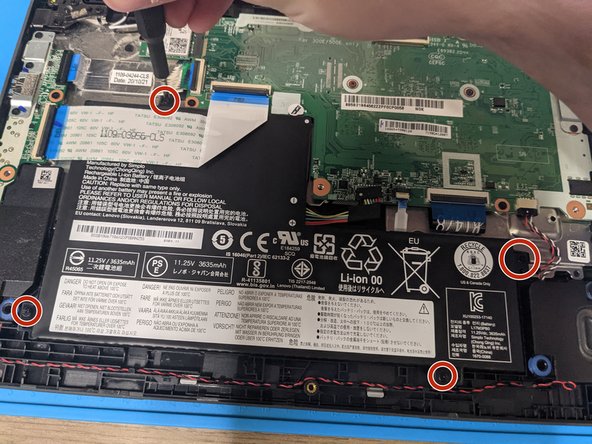
- Remove the black tape covering the connector, then using a spudge tool, carefully unplug the battery from the motherboard
- Remove the 4 screws holding in the battery and set them aside
- Make sure to separate the screws for the battery from the screws for the backing that were removed in the first step!
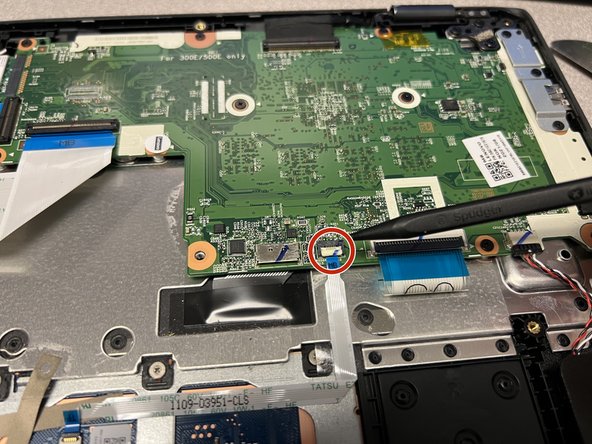
- Disconnect the Trackpad Cable by lifting the Connector.
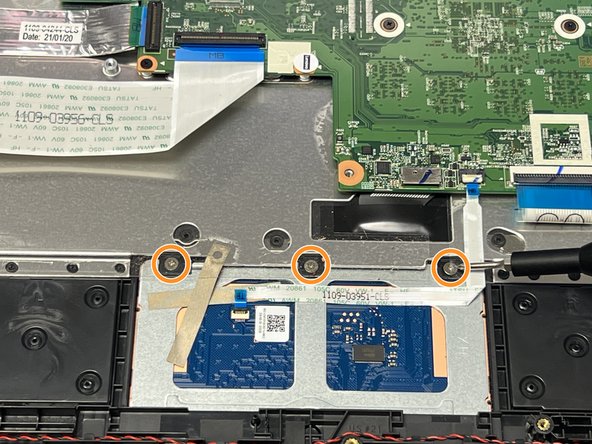
- Remove the 3 screws holding in the top of the trackpad with a Phillips #0 screwdriver
- Please make sure the Chromebook is open as the trackpad will come out from the inside of the device.
- There are 3 tabs (2 at the bottom and 1 at the top left of the trackpad), using the Spudger, push the tabs to remove the Trackpad from the case.