HP EliteBook x360 830 G7 Speakers Replacement
ID: 170646
Description: This guide shows you how to replace the...
Steps:
- Turn the computer over so that the back is facing up.
- Use a Torx T5 screwdriver to remove the three 9 mm screws from the hinge of the device.
- Use a Torx T5 screwdriver to remove the two 7 mm screws from the left and right mid-section of the case.
- Lift the backplate from the computer.
- Use a nylon spudger to gently disconnect the battery's bundled cable connector from the motherboard.
- This bundled cable connector has a tab on each side. Insert the spudger between these tabs and the motherboard's battery connector port and gently push the battery connector out and away from the connector.
- Peel back both sides of the copper foil tape connected to the battery.
- Use a JIS #1 screwdriver to remove the four 4 mm screws that secure the battery.
- Remove the battery from the laptop.
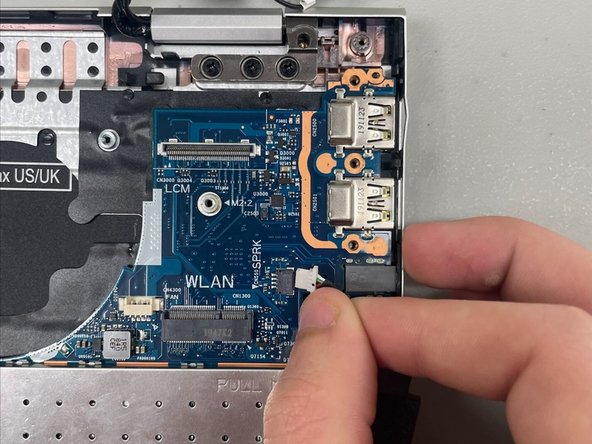
- Gently pinch the white tab and pull the speaker cable out of its socket.
- Don't pull on the cables.
- If you can't get the speaker cable out by hand, use the point of a spudger to push on alternating sides of the connector to "walk" it out of its socket.
- It may take a lot of alternating before the connector comes out.
- To reconnect the cable, align the connector and use a spudger or clean fingernail to push it fully into the socket.
- Don't push on the cables themselves, or you may damage the connector.
- Remove the right and left speakers from the laptop.
- There is a wire connecting the two speakers that is still attached to the laptop, so do not pull the speakers apart or away from the device.
- Disconnect the speaker wire from the wire hooks along the edge of the chassis.