Fixing the Phantom Double Clicking on Logitech MX Anywhere 3
ID: 171727
Description: This guide is to help you fix the phantom...
Steps:
- Those are tools you need.
- Knife and screwdriver are for opening up the mouse. You may also need an iron (which will help you to soften the glue at the mouse feet).
- Dust blower, lubricant and tissue are for fixing the click.
- Please follow the instructions in "How to Open Your Logitech MX Anywhere 3" to open up the mouse. It looks like this when you're done.
- You can heat up an iron and place it on the mouse feet to soften the glue. Be careful when using the iron.
- Disconnect the cables at the locations marked in red and orange circles. In any case, handle with care to avoid damage to the cables.
- Cables in red circles can be easily unlocked by lifting the white pins up. You, however, may need to use some force on the orange one.
- Those are tools you need for this last step.
- Use the dust blower to blow the dust away.
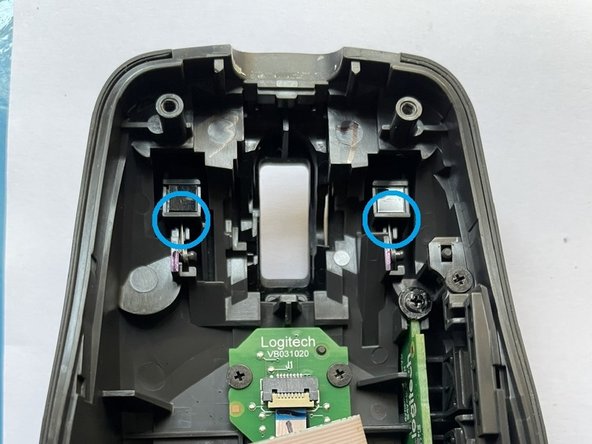
- Then, apply some lubricant to the locations marked in blue circles. Make sure you spray the lubricant into the clicking pieces in both the lower and upper parts of the mouse.
- Make a few clicks and scroll the wheel to ensure that everything works smoothly.
- Use the tissue to wipe away excessive lubricant before reassembling the mouse.